Date Text
The current date as text: weekday, month, day or year, in seven formats you can combine.
About 2 minutes
The current date as text, always correct on the watch. It's a watch face object (it isn't offered in game or app projects).
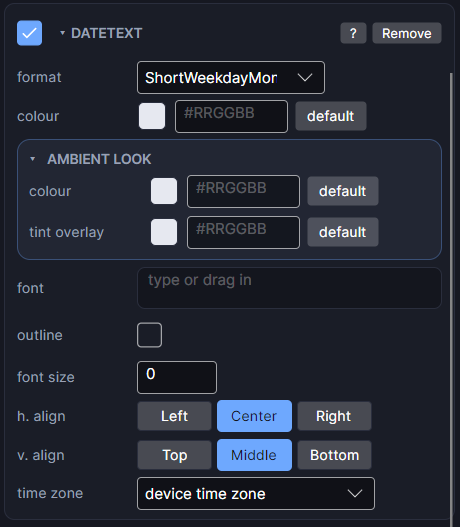
Settings
| Setting | What it does |
|---|---|
| format | How the date is written (see below). |
| colour | Text colour and opacity. |
| ambient look | The colour to use in ambient mode, if it should differ from normal. |
| font | The typeface. Type a name or drag a font file in. Empty uses the watch's default font. |
| outline | An outline around the letters. Turn it on to get outline colour and outline width. |
| font size | Size to draw at. 0 means automatic (half the box's height). |
| h. align / v. align | Where the date sits in its box. |
| time zone | Another city's date, for a world clock. Leave on device time zone normally. |
If your face has Color Styles, a style row also appears under colour. See Color Styles.
Formats
| Format | On Wed, Sep 16 |
|---|---|
| Mon, Jan 5 | Wed, Sep 16 |
| Mon, Jan 5, 26 | Wed, Sep 16, 26 |
| Jan 5 | Sep 16 |
| 1/5/26 | 9/16/26 |
| Month only (Jan) | Sep |
| Day only (5) | 16 |
| Mon 5 | Wed 16 |
| Weekday only (Mon) | Wed |
A single Date Text can't wrap onto two lines on a real watch. For a stacked date, use two objects: one Month only, one Day only.
Every object also has the shared rows (position and size, ambient look, show when, Color Style and more), explained once in Settings Every Object Shares.