Bind Visible
Shows or hides an object once a variable crosses a threshold: a pure gate, no animation.
About 2 minutes
Bind Visible shows an object only while its checks pass, and hides it the rest of the time. Use it for a "You win" banner, a button that appears once something is unlocked, or a hint that shows while a field is empty.
Settings
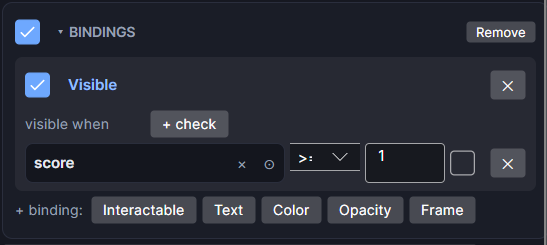
Bind Visible lives in the object's Bindings card as the Visible binding.
| Setting | What it does |
|---|---|
| visible when | The checks. With none, it reads always and the object always shows. |
| all of these / any of these | (two or more checks) Whether every check must pass, or just one. |
| + check | Adds a check row. Each row has its own ✕ to remove it. |
| On/off checkbox | Turns this binding off without removing it. |
What a check can look at
Click the left slot of a check to pick a variable or an object, or drag one in.
| You pick | You can test |
|---|---|
| A number variable | ≥ ≤ > < = ≠ a number. Tick the small box beside the value to compare against another variable's live value instead. |
| A Bool variable | is true / is false |
| An option (list) variable | is / is not one of its options |
| A text variable | is empty, has text, equals some text, length ≥ or length ≤ a number |
| An Input Field object | Its typed text, with the same tests as a text variable |
| Any other object | is visible / is hidden |
Text checks with equals ignore upper and lower case and spaces at the ends.
Good to know
- Hiding a parent hides its children too.
- A hidden object can't be tapped.
- It's an instant show and hide. Add a Transition to the same object to fade, pop or slide it in and out instead.
- To dim something rather than hide it, use Bind Opacity.
- Works in Game and App projects on both watches. Watch faces use the object's own show-when setting instead.