Physics
Gravity, mass, and collision response. Dynamic, Kinematic, or Static.
About 2 minutes
Add Physics to make an object fall, collide, rest and bounce instead of sitting where you placed it. On its own it drops under gravity (a dropped block in a stacking game). Add a Move too and Move gives it a starting speed and direction (a launched ball).
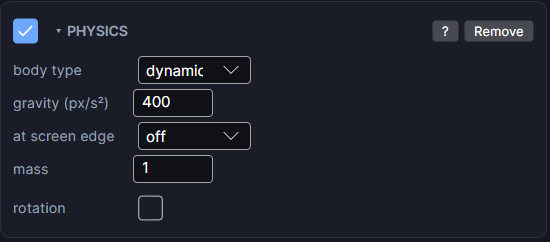
Settings
| Setting | What it does |
|---|---|
| body type | dynamic (the default) falls under gravity and can be pushed, rest and bounce. kinematic ignores gravity and is never pushed, but still blocks a dynamic body that hits it. static works the same as kinematic for now. |
| gravity (px/s²) | How fast a dynamic body speeds up as it falls. Bigger numbers fall faster. |
| at screen edge | What a dynamic body does at the screen edge. off lets it drift away, wrap brings it back on the opposite side, bounce reflects it, sticky stops it dead at the edge. |
| mass | Only matters when two dynamic bodies hit each other: the heavier one pushes the lighter one more than it gets pushed. It does not change how fast things fall. |
| rotation | Off by default. Turn it on and a solid hit can spin the object, depending on where it was struck. Only does something on a dynamic body. |
Landing on things
Physics alone falls straight through everything. To land and rest on a floor:
- Give the falling object a Collider and uncheck is trigger.
- Give the floor a Collider and uncheck is trigger there too.
Both sides must be solid. To make it bounce, raise bounciness on the floor's Collider. No action needed.
Picking a body type
- dynamic: anything that should fall or get knocked around (a bird, a crate, a ball).
- kinematic: something you move yourself, with Control or Move, that should still feel solid (a paddle, a moving platform).
- static: same as kinematic today. Use it for things that never move, so your intent is clear.
Physics overrides Move's edge setting
When an object has both Physics and Move, Move's own at edge setting is ignored. Use at screen edge here instead.
Good to know
- A body that drifts off with off keeps existing. If it was spawned, add a Lifetime so it cleans itself up.
- Actions can steer a physics body: push changes its speed (a dash or a ground pound), and bounce on a Collider's action list reflects it off a trigger.
- To pin two bodies together or hang one from a point, see Joint.
- Games only. Works in Preview and on both Wear OS and Apple Watch.