Tilemap
Paints a grid of tiles from a tileset: the Tile Palette does the actual painting.
About 4 minutes
A Tilemap is a grid of cells you paint with tiles to build a level: grass, walls, floors, water. You set the grid here, then do the painting in the Tile Palette. Games only.
The quickest way to get one is Add Object ▸ Tilemap, which drops a tile layer already lined up with the level grid.
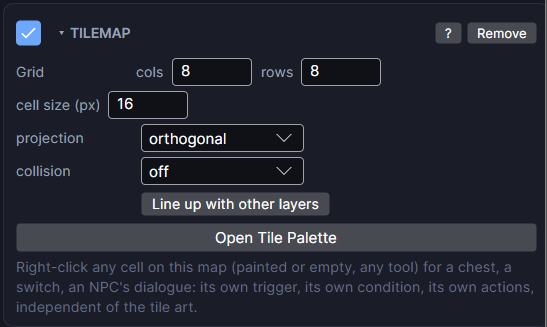
Settings
| Setting | What it does |
|---|---|
| Grid (cols, rows) | How many cells wide and tall the map is. The object's box resizes to match. Cells never stretch: adding columns adds cells. |
| cell size (px) | How big one cell is. Match it to your project's scene grid so cell edges land on the grid lines. Changing it also snaps the map back onto the grid. |
| projection | orthogonal is a flat, top-down grid. isometric draws the same grid as diamonds for a tactics-style look. Your painted tiles are kept either way, only the on-screen shape changes. |
| collision | What blocks movement on this layer. solid tiles only: only tiles you ticked Solid (collision). every tile: anything painted here blocks (handy for a walls layer). off: nothing blocks, not even Solid tiles (a floor). Tile tags, tile actions and tile events still work in every mode. |
| Line up with other layers | Moves this map to the nearest spot where its cells sit exactly on another tilemap's cells (same projection and cell size). Dragging a tilemap snaps this way too. |
| column tile | Isometric only. What fills the column under a raised cell so it reads as solid ground. Leave it on (the cell's own tile) for block art. Paint heights with the Height tool in the Tile Palette. |
| over units | Isometric only. On: this layer draws over every character (tree tops, roofs, a bridge). Off: it sorts with the ground tile by tile, so characters can walk behind its tall tiles. |
| Open Tile Palette | Opens the Tile Palette so you can pick tiles and paint. |
| Re-resolve auto-tiles | Only shows on a map with auto-tiled cells. Rechecks every auto-tiled cell against its brush's current pieces. Use it after you edit an auto-tile. It only repaints, it never erases. |
Making tiles
Tiles are assets in the Project panel. Right-click in the Project panel and choose New tile, then one of:
- Tile: one picture. Set its sprite, and tick Solid (collision) for walls. A tile can also be bigger than one cell (its size (cells)), and can have a tag so a Collider can react to it by name (spikes, water, a goal).
- Animated tile: cycles through frames, like water or a torch.
- Auto-tile: picks the right edge or corner piece on its own as you paint, so paths and cliffs join up.
- Tile palette: a board to arrange your tiles on for painting.
You can also drop a sliced sprite sheet onto a palette board to turn every slice into a tile in one go. See Tile Palette.
Layers
Stack several Tilemap objects to build a level in layers: ground, details, walls, roofs. Give them the same cell size and they line up cell for cell. The Tile Palette's + Layer button does this for you.
Cell events
Right-click any cell on the map (painted or empty, with any tool) to give that cell its own trigger, condition and actions: a chest, a switch, a sign, a door. It works independently of the tile art underneath.
Good to know
- Solid tiles stop a Physics body and a Grid Move step.
- The map is baked into the build, so it runs on both Wear OS and Apple Watch. The Paint tile action, which changes tiles while the game runs, works in Preview only for now.
- Tilemaps are a Game feature. They don't appear in App or Watch Face projects.
- Related components: Grid Highlight and Grid Cursor for tactics maps, Room Cover for rooms that light up as you enter, and Camera to scroll around a big map.