← All tutorials
Step Count
The wearer's step count as text or a gauge that fills toward their real step goal.
About 4 minutes
Shows today's step count, from the watch's own step counter.
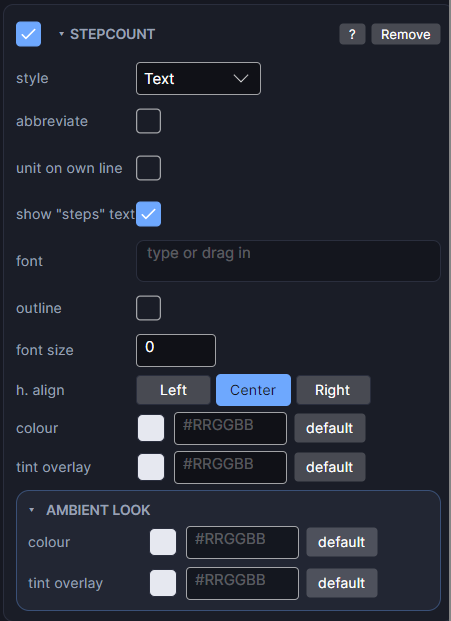
Settings
| Row | What it does |
|---|---|
| style | Text, or a Ring, Bar or Circle gauge. On a real watch, gauges fill toward the wearer's own step goal. |
| abbreviate | Shows big counts compactly: 8,400 becomes "8.4k". |
| unit on own line | Puts "steps" on its own line under the number. |
| show "steps" text | Off shows just the number. |
| font / font size | Typeface and size. Size 0 means automatic. |
| h. align / v. align | Where the reading sits in its box. |
| colour | The colour of the text or gauge. |
For the Ring, Bar and Circle styles, the gauge shape rows (shape, blips, gap, taper, track colour) work like they do on Progress Arc.
The Scene uses a 10,000 step goal as a placeholder. Change it, and the step count, in the Simulate tab.
Every object also has the shared rows (position and size, ambient look, show when, Color Style and more), explained once in Settings Every Object Shares.