Tap In Flight
Tap In Flight gives a launched shot a special move.
About 2 minutes
Tap In Flight gives a launched shot a special move. Put it on the prefab your slingshot fires (a bird, a golem). After a launch, the first tap anywhere on the screen runs its actions once, on the shot: a mid-air dash, a ground pound, a split.
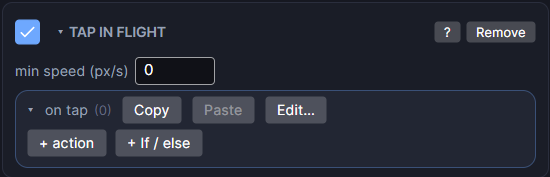
Settings
| Setting | What it does |
|---|---|
| min speed (px/s) | The shot must be moving at least this fast for a tap to count, so a shot that has come to rest can't dash. 0 means any speed. |
| on tap | The actions to run once when the player taps. "Self" is the shot. |
Two classic moves
Add a Push action to on tap, aimed at the shot itself:
- Dash: keep speed ×
1.8, then add X0, Y0. The shot speeds up along its path. - Ground pound: keep speed ×
0, then add X0, Y650. The shot stops and slams straight down.
Add a sound, particles or a shake to the same list for some extra punch.
How to set it up
- Make your shot a prefab with a dynamic Physics body and a Collider.
- Add Tap In Flight to the prefab's top object and fill in on tap.
- Pick the prefab as launch prefab (or in the launch roster) on your slingshot's Control.
Good to know
- Only the latest launched shot listens. Each shot can use its move once.
- The tap still reaches any button under the finger, so keep buttons away from where players tap mid-flight.
- Push needs a Physics body on the shot. Without one, it does nothing.
- Different shots can have different moves: give each prefab in the launch roster its own Tap In Flight.
- Games only. Works in Preview and on both Wear OS and Apple Watch.