← All tutorials
Digital Clock
The current time as text, in 12 hour, 24 hour or the wearer's own setting, with seconds or just the hour or minute.
About 3 minutes
The current time as text, drawn by the watch itself so it's always right.
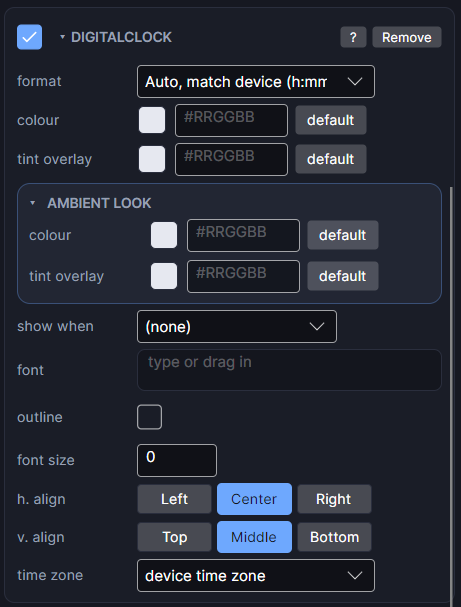
Settings
| Row | What it does |
|---|---|
| format | How the time is written (see below). |
| colour | Text colour and opacity. |
| font | The typeface. Empty uses the watch's default font. |
| font size | Size to draw at. 0 means automatic. |
| h. align / v. align | Where the time sits in its box. |
| outline | An outline around the digits, with its own colour and width. |
| time zone | Another city's time, for a world clock. Leave on device time zone normally. |
Formats
| Format | Shows |
|---|---|
| Auto, match device (h) | Follows the wearer's own 12 or 24 hour setting. The usual choice. |
| Auto, match device (h:mm) | The same, with seconds. |
| 24-hour (h or h:mm) | Always 24 hour. |
| 12-hour (h or h:mm) | Always 12 hour. |
| Hour only (24 or 12 hour) / Minute only | Just one part, so you can style them separately: a big hour with a small minute beside it. |
The Scene shows 24 hour for the auto formats, since it can't know a wearer's setting.
In ambient mode
Digital clocks stay visible in ambient by default. Seconds formats are best avoided there, since the screen barely updates.
Every object also has the shared rows (position and size, ambient look, show when, Color Style and more), explained once in Settings Every Object Shares.