Transition
Transition animates an object in when it appears and out when it goes away: fade, slide, scale, pop, drop, spin or flip.
About 2 minutes
Transition animates an object in when it appears and out when it goes away: fade, slide, scale, pop, drop, spin or flip. Put it on a panel, a button or a reward so things arrive with a bit of life instead of just popping on.
The in animation plays when:
- its screen opens (unless play on open is off),
- an action turns the object on,
- its Bind Visible starts passing.
The out animation plays when it's turned off or its Bind Visible stops passing. The object stays drawn until the out animation finishes. Everything inside it moves with it.
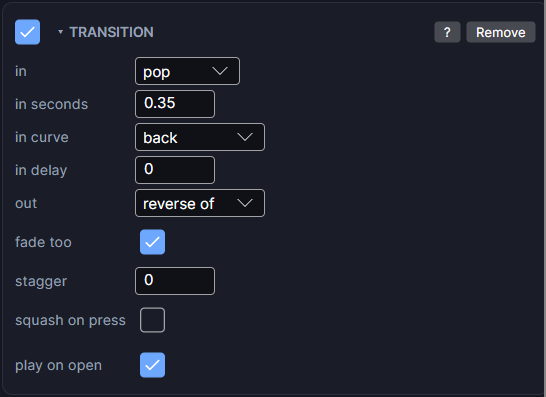
Settings
| Setting | What it does |
|---|---|
| in | How it arrives: none, fade, slide, scale, pop, drop, spin or flip. For slide, a second menu picks the edge: from bottom, from top, from left or from right. |
| in seconds | How long the in animation takes. Starts at 0.35. |
| in curve | The motion: smooth, linear, ease in, ease in-out, back (overshoots), bounce (lands) or elastic (wobbles). Picking a style sets a matching curve for you. |
| in delay | Seconds to wait before it starts. Handy for making things arrive in order. |
| out | How it leaves. reverse of in plays the in animation backwards. Or pick its own style; for slide, choose the edge it leaves to. |
| out seconds | (own out style) How long the out animation takes. |
| out curve | (own out style) Runs backwards on the way out, so back pulls in before it leaves. |
| out delay | (own out style) Seconds to wait before leaving. |
| distance | (slide or drop) How far it travels, in pixels. 0 means from just off the screen edge. |
| fade too | Also fades while it slides, scales, spins or flips. |
| stagger | Seconds between each child's entrance. 0 is off. On a panel, its children arrive one after another. |
| squash on press | Shrinks a little while pressed and springs back. Needs a Tappable on the same object. |
| play on open | Plays the in animation when the screen opens. Off: it's already in place when the screen opens, and only animates when turned on later. |
Tips
- pop pairs well with back, drop with bounce.
- For a menu that builds itself, put a Transition with a stagger of about
0.08on the panel. Each button then enters in turn. - For a looping motion that never stops, like a pulsing coin, use Animate instead.
Good to know
- Works in Game and App projects on both watches. Not offered on watch faces.