Complication Edge
A complication slot that curves along the bezel. Shows short text, long text, a range value, goal progress or weighted elements.
About 3 minutes
A Complication Edge is a slot that curves along the bezel, for live data from the watch or its apps. You set where it sits and how it looks; the wearer chooses what it shows from their watch's face editor. See Complications for how slots work in general.
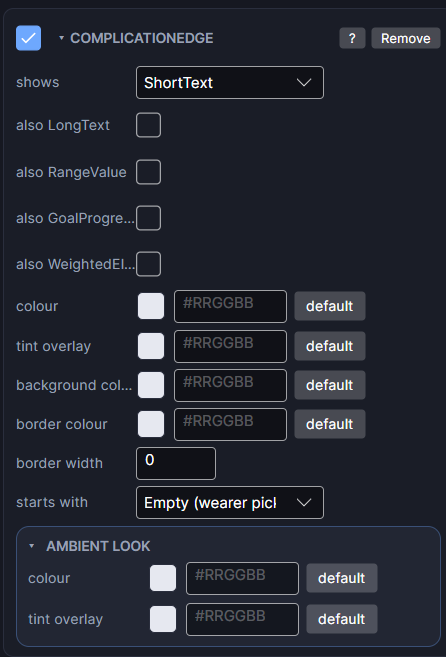
It can show: short text, long text, a range value, goal progress or weighted elements.
Settings
| Row | What it does |
|---|---|
| shows | The main kind of data the slot is built for. The wearer is only offered data sources that fit. |
| also | Tick more kinds to accept them too. More kinds means more sources the wearer can choose from. |
| starts with | What the slot shows before the wearer picks anything: watch battery, step count, heart rate, date, day of week, day and date, time and date, world clock, next event, sunrise and sunset, an app shortcut or a favourite contact. Empty (wearer picks) leaves it blank until they choose. |
| fixed | Appears once starts with is set. The wearer can't change this slot; it always shows that source. |
| colour | The colour of the slot's text and icon. |
The Scene fills the slot with sample data so you can judge the layout. Its box (Size) sets how much room the data has.
Edge slots are special
- A face can have one Edge setup. Once you add one, the Edge entries disappear from Add Object.
- Complication Edge (Duo) creates two slots (left and right) and (Quad) creates four (one per quarter), already positioned around the bezel. You can delete any of them afterwards.
- It's the only shape that takes goal progress and weighted elements. Those have no built-in source on Wear OS, so they start empty for the wearer to fill.
Every object also has the shared rows (position and size, ambient look, show when, Color Style and more), explained once in Settings Every Object Shares.