Joint
Pins a point on this object to a point on another, or a fixed point in the world.
About 2 minutes
A Joint pins a point on this object to a point on another object, or to a fixed spot in the world, so the two points stay together. Use it for a swinging pendulum, a hanging sign, a seesaw, or two blocks stuck together until a hard hit breaks them apart.
Joint works in Preview but is not built into the Wear OS or Apple Watch app yet. On a real watch the objects move as if there were no joint.
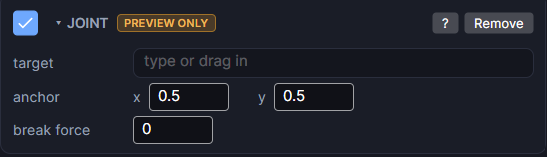
Settings
| Setting | What it does |
|---|---|
| target | The other object to pin to. Pick it or drag it in from the Hierarchy. Leave empty to pin to a fixed point in the world. |
| anchor (x, y) | Where on this object the pin sits, from 0 to 1 across its box. 0.5, 0.5 is the centre; 0.5, 0 is the top middle. |
| other anchor (x, y) | Shows once a target is set. Where on the target the pin sits, from 0 to 1 across its box. |
| break force | How hard a hit the joint can take before it snaps apart. 0 (the default) never breaks. |
Making it swing
A joint is a pin, not a weld: the two objects can turn around the shared point. For that to happen, turn on rotation on the Physics component of this object (and the target, if it should turn too). With rotation off, the pin holds the points together but nothing turns.
A pendulum
- Add a dynamic Physics body to the weight and turn on rotation.
- Add a Joint with no target and set anchor to
0.5,0(the top middle). - Press Play and give it a push. It swings from the spot where its anchor was when Preview started.
Good to know
- This object needs a dynamic Physics body. Without one, the joint does nothing.
- With no target, the fixed point is wherever the anchor was the moment play started.
- After a joint breaks, the two objects collide normally as solid bodies.
- Only pin joints. There are no motor or spring joints.
- Games only.