Rotary
Reads the digital crown or bezel directly and adds to a variable, no Tappable needed.
About 1 minutes
Rotary lets the player change a number by turning the watch's crown or rotating bezel. Each notch one way adds to the variable; the other way subtracts. Use it for a volume setting, a menu index or a dial.
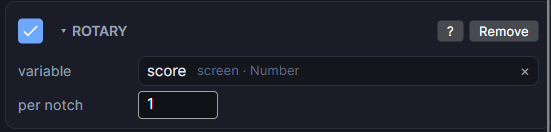
Settings
| Setting | What it does |
|---|---|
| variable | The variable the crown changes. |
| per notch | How much one notch adds. Turning the other way subtracts the same amount. A negative number flips the direction. |
Good to know
- There's no minimum or maximum. To keep the value in range, add an action that clamps it, or see Wrapping a counter to loop it around.
- If an object on the screen has a Control set to the crown, the crown moves that object and Rotary waits.
- Every Rotary on the screen reacts to the crown at the same time.
- In Preview, your mouse wheel stands in for the crown.
- Turning the component off (for example with a disable-component action) stops it reacting until it's turned back on.
- Works in Game and App projects on both watches. Not offered on watch faces.