Collider
Detects (or blocks) another object: the trigger half of hits, pickups, and solid ground.
About 3 minutes
A Collider gives an object a hit shape (a box or a circle). When it touches another collider, it can run a list of actions, like adding a point, destroying a coin or sending an event. Uncheck is trigger and it becomes solid, so Physics objects land on it and bounce off it.
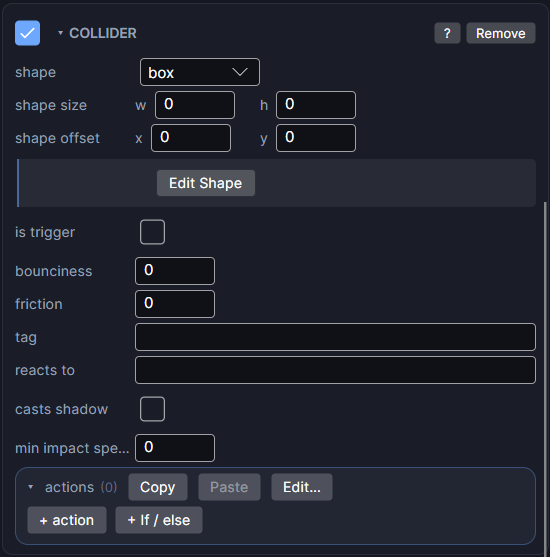
Settings
| Setting | What it does |
|---|---|
| shape | box or circle. |
| shape size (w, h) | The hit shape's own size. 0 (the default) uses the object's own width or height. |
| shape offset (x, y) | Moves the hit shape away from the object's centre, in px. Positive x is right, positive y is down. |
| Edit Shape | Shows handles in the Scene so you can drag the hit shape's edges and centre. The amber outline is the real hitbox. Click again to stop. |
| is trigger | On: only detects touching. Off: solid. A Physics object is pushed out and stopped instead of passing through. |
| bounciness | How much a solid pair bounces apart. 0 is no bounce. When two colliders meet, the higher value of the two wins. |
| friction | Slows a body that is resting or sliding on this surface, so stacks settle instead of creeping. The two sides' values are averaged. |
| tag | A name for what this object is, like coin or enemy. Other colliders use it in reacts to. |
| reacts to | Only run the actions when the other collider has this tag. Leave empty to react to anything. |
| casts shadow | Blocks the glow of a Light 2D, using this hit shape. Separate from trigger or solid. |
| min impact speed | The actions only run when the hit is at least this fast. 0 (the default) means any touch counts. |
| actions | What happens the moment they first touch, top to bottom. |
Trigger or solid
- Trigger (checked): good for coins, pickups, goal zones and damage areas. Things pass through, and the actions run.
- Solid (unchecked): good for floors, walls and blocks. For a Physics object to actually stop, both colliders must have is trigger unchecked.
Put bounciness on the surface (a springy floor, a rubber wall) rather than on everything that lands on it. One bouncy side is enough.
A coin the player collects
- Give the coin a Collider with tag
coinand no actions. - Give the player a Collider with reacts to
coin, and add actions: add 1 toscore, then destroy the other object.
The passive side (the coin) only needs a tag. Whatever touches it does the reacting.
Acting on the other object
An action's target can be the collider itself or the other object it touched. See Targeting Self, Other and Named.
Set min impact speed once here (a block that only breaks on a hard hit) instead of on every action. Any single action can still set its own threshold with its override impact checkbox.
Good to know
- The actions run once, on the frame the two first touch, not every frame they overlap.
- casts shadow only matters on a screen that has a Light 2D.
- Games only. Works in Preview and on both Wear OS and Apple Watch.