Clip
Clips a group's children to its own box: the base primitive a Scroll rect is built on.
About 1 minutes
In the Add Component menu this is called Mask. It cuts off anything inside an object that spills past the object's own box, like a window frame. Add a corner radius to round the corners, or a big radius to make a circle (a round avatar picture).
Two different Masks
In games and apps, Mask clips an object's children to its box, as described here. Watch faces have their own, different Mask that uses a shape to cut out the other objects in its group.
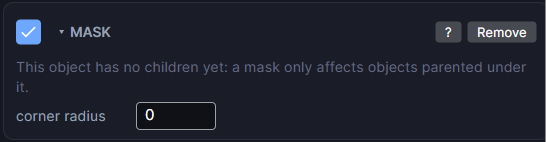
Settings
| Setting | What it does |
|---|---|
| corner radius | Rounds the corners of the cut-off box, in px. 0 is sharp corners. A radius of half the box's shorter side or more makes a circle or pill. |
How to use it
- Put Mask on a parent object, not on the picture itself.
- Put the objects you want clipped inside it in the Hierarchy.
- Anything outside the parent's box is hidden.
If the object has no children yet, the card reminds you: a mask only affects objects inside it.
Good to know
- Mask only hides things. The player can't reach what was cut off. To let them drag or crown-scroll it into view, use Scroll instead. Scroll adds a Mask for you.
- For a round profile picture, give a square parent a Mask with a corner radius of half its width, then put the Image inside.
- Games and apps. Works in Preview and on both Wear OS and Apple Watch.