Bind Opacity
Bind Opacity fades an object to a set opacity while its checks pass, and leaves it at its normal opacity otherwise.
About 1 minutes
Bind Opacity fades an object to a set opacity while its checks pass, and leaves it at its normal opacity otherwise. Use it to dim a locked level instead of hiding it, or to fade a hint once it's been read.
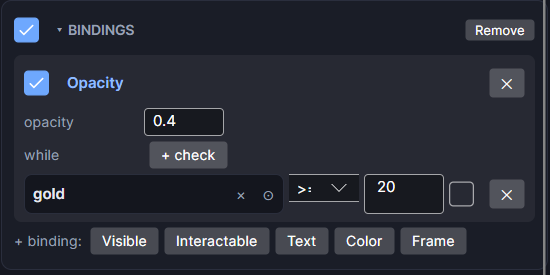
Settings
Add it from Add Component ▸ Bind Opacity, or with + binding: Opacity on an existing Bindings card.
| Setting | What it does |
|---|---|
| opacity | The opacity while the checks pass, from 0 (invisible) to 1 (solid). Starts at 0.4. |
| while | The checks. With none, it reads always and the opacity always applies. |
| all of these / any of these | (two or more checks) Whether every check must pass, or just one. |
| + check | Adds a check row. Each row has its own ✕ to remove it. |
| On/off checkbox | Turns this binding off without removing it. |
The checks work the same way as in Bind Visible.
Good to know
- The object's children fade with it.
- The value multiplies the object's own opacity. An object already at 50% with an opacity of
0.5ends up at 25%. - A faded object can still be tapped. To stop taps too, use Bind Interactable.
- Works in Game and App projects on both watches. Not offered on watch faces.