Move
Constant speed and direction, no acceleration: a bullet, a conveyor, a patrolling enemy.
About 1 minutes
Move sends an object along at a steady speed in one direction: a bullet, a cloud drifting by, a conveyor belt. There is no gravity or speeding up. For that, add Physics.
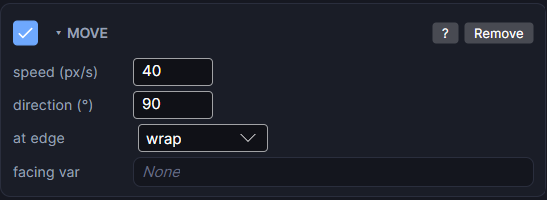
Settings
| Setting | What it does |
|---|---|
| speed (px/s) | How fast it moves, in pixels per second. 0 stands still. |
| direction (°) | Which way it moves, in degrees. 0 is right, 90 is down, 180 is left, 270 (or -90) is up. In between goes diagonal: 45 is down-right. |
| at edge | What happens at the screen edge. off flies away, wrap comes back on the other side, bounce reflects off the edge. |
| facing var | Optional. A variable that gets 0 (right), 1 (down), 2 (left) or 3 (up) while it moves. Use it to pick a sprite facing the right way. |
With Physics
Add Physics to the same object and Move only gives it a starting push. From then on, Physics moves it, gravity pulls on it, and Physics's own at screen edge setting is used instead of at edge.
Pair with Lifetime for anything spawned
A bullet usually wants a short Lifetime too, so it removes itself after flying off instead of living forever.