Bind Interactable
Bind Interactable decides whether the player can tap an object.
About 2 minutes
Bind Interactable decides whether the player can tap an object. While its checks fail, the object greys out and taps do nothing. A shop's Buy button while you can't afford it is the classic use.
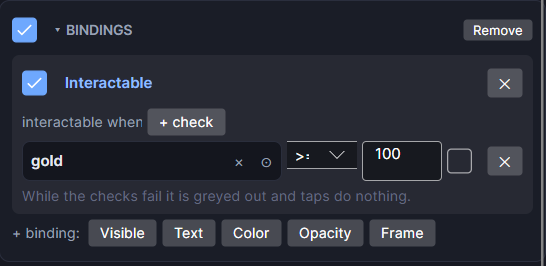
Settings
Add it from Add Component ▸ Bind Interactable, or with + binding: Interactable on an existing Bindings card.
| Setting | What it does |
|---|---|
| interactable when | The checks. With none, it reads always and the object always works. |
| all of these / any of these | (two or more checks) Whether every check must pass, or just one. |
| + check | Adds a check row. Each row has its own ✕ to remove it. |
| On/off checkbox | Turns this binding off without removing it. |
The checks work the same way as in Bind Visible: numbers, Bool and text variables, an Input Field's text, or whether another object is showing.
What it affects
- A Tappable, an Input Field, an IAP Button or a Slider on the object stops responding.
- The object drops to 40% opacity, and so do its children, so a button's label fades with it.
- A tap on a greyed-out object is used up. It doesn't fall through to whatever is behind it.
Example
On a Buy button, add one check: gold ≥ 50. Tick the box beside the value and pick price instead if the cost lives in a variable.
Good to know
- Want a different look than the standard grey? Add a Bind Opacity with the opposite check, or a Bind Color. A passing Bind Opacity replaces the grey-out.
- Works in Game and App projects on both watches. Not offered on watch faces.