IAP Button
A self-contained purchase or restore button, wired to a product in the IAP Catalog.
About 2 minutes
An IAP Button is a ready-made purchase button. Tap it and it buys a product from your IAP Catalog, or restores what the player already bought. It handles the tap itself, so you don't need a Tappable on the same object. Works in Game and App projects.
Add it from Add Component ▸ IAP Button (under Interaction), or get a ready one with Add Object ▸ Buy Button: a button with a title and a price label already wired to the IAP Button. Just pick a product.
New to selling things in your game? Start with In-App Purchases.
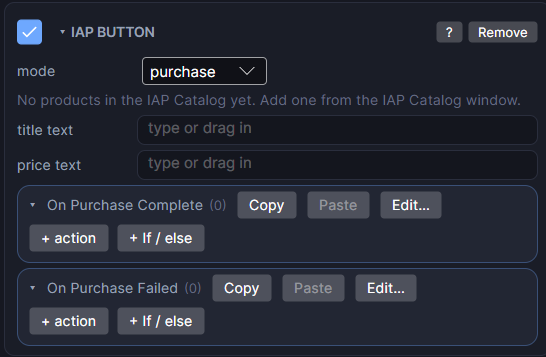
Settings
| Setting | What it does |
|---|---|
| mode | purchase buys the one product picked below. restore brings back every non-consumable the player already owns, for example after reinstalling. It has no product of its own. |
| product | Shown in purchase mode. Which IAP Catalog product this button buys. If the catalog is empty, the card tells you to add one in the IAP Catalog window first. |
| title text | Optional, purchase mode. Drag in another Text or Button from the screen. On a real watch, its words are replaced by the product's title from the store. |
| price text | Optional, purchase mode. Same idea, but shows the store's formatted price in the player's own currency. |
| On Purchase Complete | Actions that run after a successful purchase or restore. |
| On Purchase Failed | Actions that run when the store reports an error or the player cancels. |
What happens on a purchase
When a purchase goes through, the product's own catalog settings are applied first: a consumable adds its amount to its count variable, and a non-consumable sets its owned variable to 1. Then On Purchase Complete runs. Use it for a thank-you message, a sound, or to hide the button.
Testing in Preview
Preview never talks to a real store, so it can't show a real purchase:
- Tapping a button with a valid product always succeeds straight away.
- On Purchase Failed only runs in Preview when the product is missing from the catalog. That's a setup mistake worth catching.
- title text and price text keep their own words in Preview. The real title and price show on a watch.
Test cancellations and errors on a real watch.
Good to know
- If the product is removed from the IAP Catalog, the card shows a warning, and tapping the button runs On Purchase Failed instead of buying anything.
- Works on both Wear OS (Google Play Billing) and Apple Watch (StoreKit).
- Not available in Watch Face projects, since a watch face can't run a purchase.