← All tutorials
Group Tint
Tint everything in a Group at once, and let the wearer recolour the whole set with one Color Style pick.
About 4 minutes
The Group Tint component (Add Component, watch faces only) tints every object inside a Group at once. Bind it to a Color Style and the wearer recolours the whole set with a single pick: all the icons, all the gauges, the whole accent colour of the face.
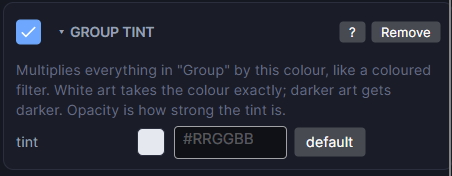
Settings
| Row | What it does |
|---|---|
| tint | The colour multiplied over everything in the Group. White leaves them unchanged. |
| style / colour # | Bind the tint to a Color Style so the wearer can pick it on the watch. |
It only works on a Group; on anything else the Inspector warns you. Tinting works best on white or light artwork, since the tint multiplies the colours underneath.