Seek
Chases a target within detect radius, then holds at attack range. It doesn't attack on its own.
About 1 minutes
Seek makes an object chase another one (usually the player) once it gets close enough. It stops at a set distance instead of walking on top of its target. Seek only moves. It never attacks on its own, but it can flip a variable you use to start the attack.
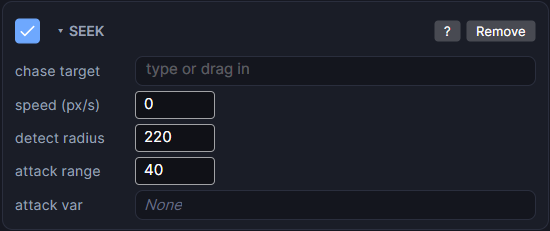
Settings
| Setting | What it does |
|---|---|
| chase target | The object to chase. Pick it or drag it in from the Hierarchy. Empty means it never moves. |
| speed (px/s) | How fast it closes in, in pixels per second. |
| detect radius | It ignores the target until the target is this close. |
| attack range | It stops closing in once it is this close. Keep it smaller than detect radius. |
| attack var | Optional. Set to 1 while the target is inside attack range and 0 otherwise. |
Making it attack
- Set attack var to a variable such as
slimeInRange. - Use a rule in the Events panel that runs when
slimeInRangebecomes1: take away health, play a sound, start an animation.
Good to know
- Seek moves in a straight line toward the target. It does not path around walls.
- If the object also has a dynamic Physics body, Physics wins and Seek does nothing. Seek wins over Move.
- For enemies that walk tile by tile and path around walls, use Grid Move with chase target instead.
- Games only. Works in Preview and on both Wear OS and Apple Watch.