Room Cover
Room Cover hides the rooms of a level the player isn't in.
About 2 minutes
Room Cover hides the rooms of a level the player isn't in. Put it on a black box laid over one room: while the player is inside, the box fades away so you see the room. When he leaves, it fades back to dark. Add one per room and the player only sees the room he's standing in. Games only.
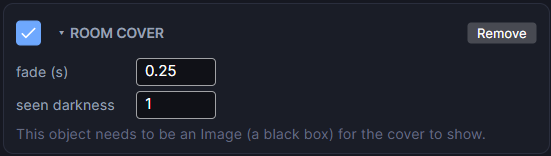
Settings
| Setting | What it does |
|---|---|
| fade (s) | How long a room takes to fade in or out. 0 is instant. 0.25 by default. |
| seen darkness | How dark a room you've already visited stays. 1 covers it fully again (the default), 0.6 dims it so you can still see the layout, and 0 leaves it uncovered once explored. |
Setting up a room
- Add an Image over the room, make it black, and size it to cover the room exactly.
- Add a Room Cover to that Image.
- Repeat for each room.
The object has to be an Image. If it isn't, the card warns you that the cover won't show.
Good to know
- The player is whichever object has a Grid Move set to player input. A room starts to reveal as soon as he steps toward it.
- Where rooms overlap, the smaller one wins.
- In a doorway between rooms (outside every box), the last room stays lit while he's within a tile of it.
- It works out the right room from where the player stands at every moment, so loading a save, teleporting and arriving on a Spawn Point need no extra actions. After a teleport or arrival, rooms snap into place instead of fading.
- Covers stay see-through in the Scene so you can still paint the Tilemap underneath.
- Works on both Wear OS and Apple Watch.
- Room Cover is a Game feature. It doesn't appear in App or Watch Face projects.