← All tutorials
Segmented Arc
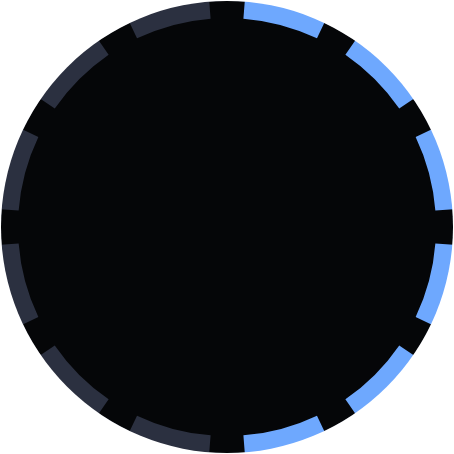
A ring of separate marks that light up one by one as a value rises: the stepped 'blips' gauge.
About 4 minutes
A ring of separate marks that light up one at a time as a value rises: the stepped "blips" look many faces use for a step goal, battery level or countdown. It reads more clearly at a glance than a smooth ring, since each lit mark is an exact step.
It starts as a full-screen box, so the ring sits around the edge of the face. Resize the box to move the ring inward.
Settings
| Row | What it does |
|---|---|
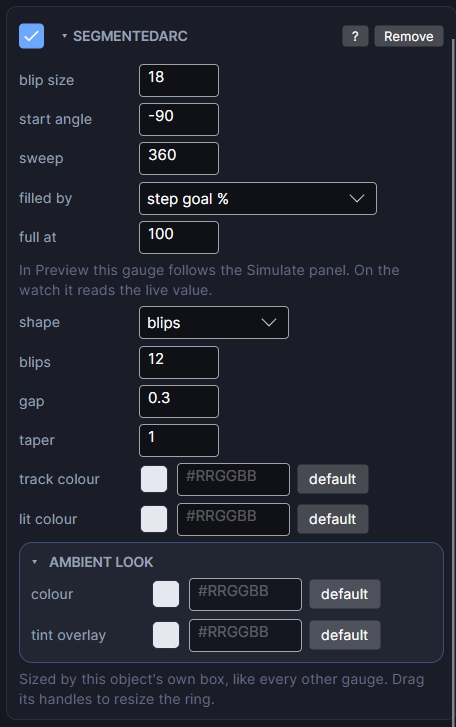
| blip size | How long each mark is: how far it reaches inward from the edge of the box, in pixels. The box sets where the ring sits; this sets how big each mark is. (Called thickness if you switch the shape to Rounded or Square.) |
| start angle | Where the ring begins, in degrees clockwise from 3 o'clock. -90 (the default) is 12 o'clock. |
| sweep | How much of the circle it covers. 360 is a full ring, 180 a half. The marks spread evenly across it. |
| filled by | Which real watch value fills it: battery, steps, step goal percent, heart rate and other numeric values. (none) draws an empty track, which is handy while positioning it. |
| full at | The value that reads as completely full. 100 for a percentage, 10000 for a raw step count, 200 for heart rate. The most common reason a gauge looks wrong is this number. |
| shape | Rounded (round ends), Square (flat ends) or Blips (separate marks that light one at a time). |
| blips | For Blips: how many marks. 10 is handy, since each lit mark then means 10 percent. |
| gap | For Blips: how much of each mark's slot is left empty, which separates them. 0 is touching; 0.3 reads clearly at watch size. |
| taper | For Blips: how much bigger the last mark is than the first. 1 keeps them equal; 2 makes the last twice the first, for a tapered wedge. |
| track colour | The colour of the unfilled part. |
| lit colour | The colour of lit marks. Unlit marks use track colour. |
Tips
- 10 blips, full at 100, filled by battery gives one mark per 10 percent.
- Taper 2 with a 270 degree sweep makes a rising wedge, like a speedometer.
- For a smooth ring instead, switch shape to Rounded, or use Progress Arc.
Every object also has the shared rows (position and size, ambient look, show when, Color Style and more), explained once in Settings Every Object Shares.