← All tutorials
Frame Animation
Play a list of pictures on an Image: a spinning gear, a flickering flame, a blink. Loop, play on the second, minute or hour, or on tap.
About 4 minutes
The Frame Animation component (Add Component, watch faces only) plays a list of pictures on an Image, one after another, like a flipbook.
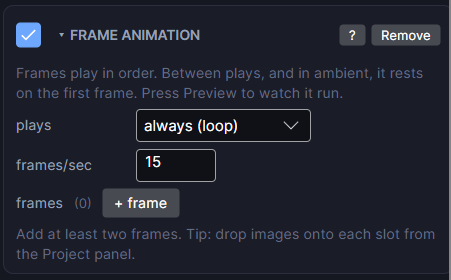
Settings
| Row | What it does |
|---|---|
| plays | Always loops while the face is on screen. Every second, every minute or every hour plays it once at each new second, minute or hour. On tap plays it when the wearer taps. |
| frames/sec | Playback speed, 1 to 60. The watch may skip frames if it can't keep up. |
| times | How many times the frames run each time it plays. |
| frames | The pictures, in order. Drop an image or one sliced cell on each slot. Drop a whole sliced sheet and every cell fills in as frames, in order. You need at least two. |
Between plays, and in ambient mode, it rests on the first frame. Press Preview (F5) to watch it run.
Battery
Always-on loops cost battery. Keep them short and small, or play them every minute or on tap instead.