Layout
Auto-arranges a group's children in a row or column, or generates one row per level.
About 2 minutes
Add Layout to an object to line up its children in a row or a column, with even spacing, instead of placing each one by hand. It draws nothing itself. In the Inspector its card is called Layout Group.
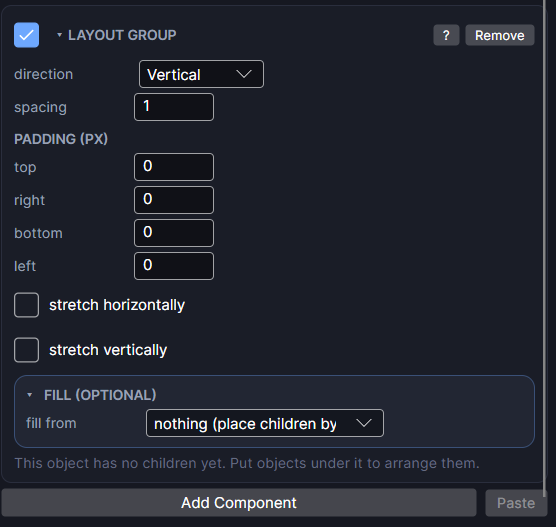
Settings
| Setting | What it does |
|---|---|
| direction | Vertical (a column) or Horizontal (a row). |
| spacing | The gap between children, in px. |
| PADDING (PX): top, right, bottom, left | Space inside each edge before the first child. |
| stretch horizontally | In a row, children share the width evenly. In a column, each child fills the full width. |
| stretch vertically | In a column, children share the height evenly. In a row, each child fills the full height. |
Children keep their own size unless a stretch box is checked. Their own positions are ignored: Layout places them, in Hierarchy order.
Put a Layout on an object that also has Scroll and you have a scrolling list.
Fill (optional)
Fill makes the children for you, one copy of a template per entry:
| Setting | What it does |
|---|---|
| fill from | nothing (place children by hand), a list, or a Level Set. |
| level set | With a Level Set: which Level Set to use. One copy per level; its first Text gets the level's name, and tapping it goes to that level's screen. |
| list | With a list: which list to show, one copy per entry. |
| template | A prefab to copy. Leave it empty and the first object you placed inside the layout is the template. |
| max rows | With a list: show at most this many (a top 10). 0 shows every entry. Rows are added and removed as the list changes. |
| empty slots | With a list: show empty frames keeps a frame for every slot up to max rows (or the list's Max entries), like an inventory grid with free spaces. |
| show only | With a list of data objects: show only some entries. Pick by an option field (like type), then tick the options to show, such as only potions. (everything) shows them all. |
| folder | With a list of data objects: only show things stored in this folder, for example Items/Furniture. Blank shows everything. |
| placed children | With a list: objects you put inside by hand hide while playing, or keep them (for a header). |
What each copy shows comes from List Entry on the template. Tapping a copy sets the list's selected to that entry's position in the full list (even when show only hides some), then runs the template's own tap actions. Showing a List walks through the whole thing.
In edit mode you see only the template. The copies are made in Preview and on the watch.
Good to know
- Grid Layout does the same in a grid, with every cell the same size.
- Fill from a Level Set replaces the old Level Select component.
- Works in games, apps and watch faces. Fill is not offered on watch faces.
- Works in Preview and on both Wear OS and Apple Watch.