Particle System
Continuous ambient emission (a torch, a smoke stack, rain) with randomized start values.
About 3 minutes
A Particle System keeps sending out little particles from its object for as long as it runs: a torch flame, a smoking chimney, falling rain, sparkles. Each particle gets slightly random start values and changes colour and size over its life. Games only.
For a one-shot burst, use an action instead
A quick burst on a tap or a hit (a spark, a coin poof) doesn't need this component running all the time. Use the Play particles action, or Emit Burst on an object that already has a Particle System.
Settings
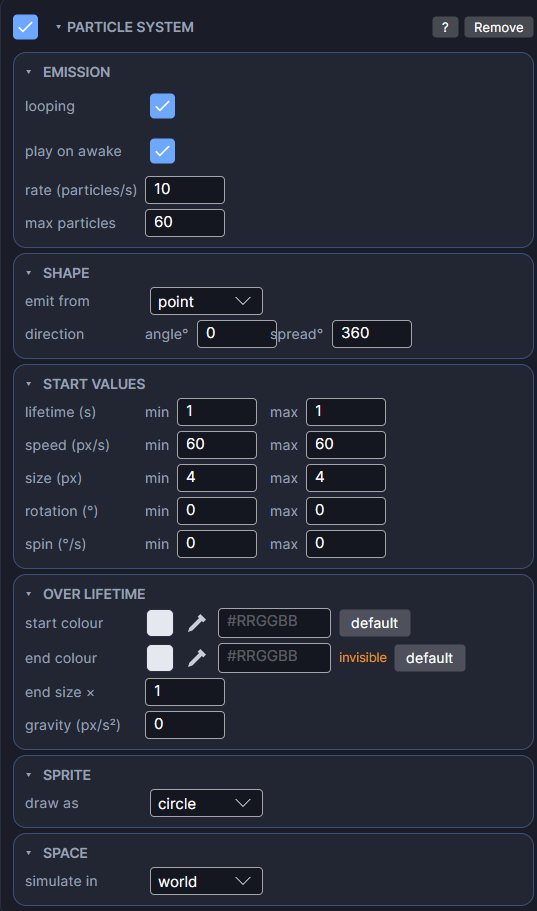
The card is split into sections you can open and close.
Emission
| Setting | What it does |
|---|---|
| looping | On: emits forever. Off: emits for duration (s), then stops. |
| play on awake | Starts emitting as soon as the screen opens. Turn it off to start it later with an Enable action on the Particle System. |
| duration (s) | Shown when looping is off. How long it emits before going idle. |
| rate (particles/s) | How many particles it sends out each second. |
| max particles | The most particles this system can have alive at once. Once it's full, a new one only appears when an old one dies. |
Shape
| Setting | What it does |
|---|---|
| emit from | Where new particles start: a point, anywhere inside a circle, or anywhere inside the object's box. |
| radius (px) | Shown for circle. The size of that circle. |
| direction (angle°, spread°) | angle° is the direction particles fly toward (0 is right). spread° is how wide a random cone they spread over around it. 360 sends them in every direction. |
Start Values
Each of these has a min and a max. Every particle rolls a random value between the two when it's born. Set both the same for no randomness.
| Setting | What it does |
|---|---|
| lifetime (s) | How long each particle lives. |
| speed (px/s) | How fast it flies out. |
| size (px) | How big it starts. |
| rotation (°) | The angle it starts at. |
| spin (°/s) | How fast it turns while alive. |
Over Lifetime
| Setting | What it does |
|---|---|
| start colour | Its colour and opacity when born. |
| end colour | Its colour and opacity when it dies. It blends smoothly between the two, so an end opacity of 0 makes particles fade out. |
| end size × | Multiplies the start size by the end of its life. 0 shrinks it to nothing, 2 doubles it. |
| gravity (px/s²) | Pulls particles down over time. Use a negative number for smoke that rises. |
Sprite
| Setting | What it does |
|---|---|
| draw as | The particle's look: circle, square, spark (a short streak along its direction), or sprite for your own image. |
| frame list and fps | Shown for sprite. Add one image, or several to animate through them. fps sets the speed. 0 (or a single frame) holds the first frame. |
Space
| Setting | What it does |
|---|---|
| simulate in | world: particles stay where they were thrown, so a moving torch leaves a trail. local: particles already in the air move along with the object (position only, not rotation). |
Good to know
- Turn the system on and off with the Enable and Disable actions for the Particle System, for example to light a campfire when the player arrives.
- Keep rate and lifetime modest. Lots of particles on a watch cost battery and can slow the game.
- Works on both Wear OS and Apple Watch.
- Particle systems are a Game feature. They don't appear in App or Watch Face projects.