Ticker
Fires on a fixed interval for as long as the object is enabled: the engine's timer.
About 2 minutes
Ticker runs its actions on a repeating timer for as long as its object is on. It's the heartbeat for anything that should happen every few seconds without the player doing anything: idle income, an auto-attack, a periodic spawn, a bird that chirps now and then.
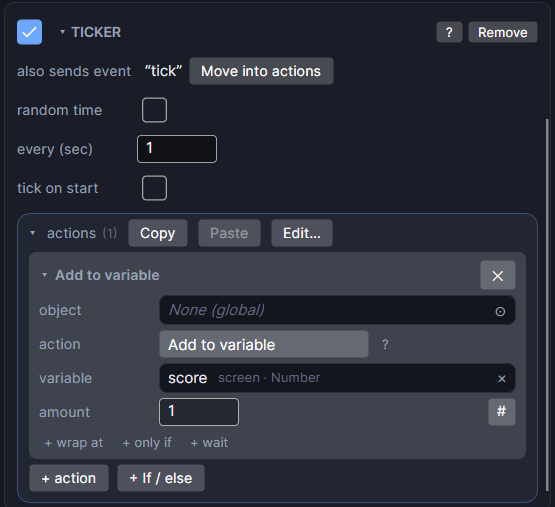
Settings
| Setting | What it does |
|---|---|
| random time | On: each tick waits a random time between two numbers, so it doesn't feel like clockwork. Off: always the same interval. |
| every (sec) | (random time off) Seconds between ticks. |
| between (sec) | (random time on) The shortest wait between ticks. |
| and (sec) | (random time on) The longest wait. Must be more than the first number. |
| tick on start | On: ticks right away when the screen opens or the object is turned on, then every interval. Off: waits one interval first. |
| actions | What happens on every tick. Click + action to add a row. |
Good to know
- Turning the component or its object off stops the timer. When it comes back on, it starts a fresh interval rather than finishing the old one.
- To tell other objects about a tick, add a Send an event action to the list and give them an On Event.
- An older project may show also sends event with a Move into actions button. Click it to turn that into a Send an event action. It works the same.
- Picking a Watch reading in Bind Text adds a Ticker for you that keeps the reading fresh.
- Works in Game and App projects on both watches. Not offered on watch faces.