Control
Steers an object by crown, drag, or buttons along one axis, including a slingshot launch.
About 5 minutes
Control lets the player steer an object: with the crown, a finger drag, on-screen buttons, or a joystick. Use it for a paddle, a selector, a ship that slides left and right, or (with a drag that launches on release) a slingshot.
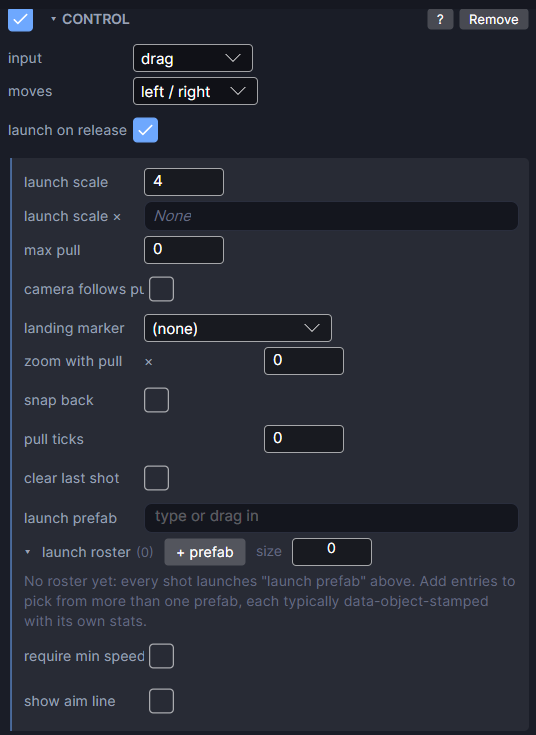
Settings
The card changes with the input you pick. These are always there:
| Setting | What it does |
|---|---|
| input | crown, drag, button or joystick. |
| moves | left / right or up / down: the one direction the object can move. Not shown for joystick. |
Crown
| Setting | What it does |
|---|---|
| px per notch | How far one click of the crown moves the object. |
Button
| Setting | What it does |
|---|---|
| on event | The event that nudges this object. A Tappable button elsewhere sends it. |
| nudge (px) | How far each tap moves it. Use a negative number for the opposite button. |
For left and right buttons, add two Control components on the same object: one listening for left with a nudge of -20, one for right with 20.
Joystick
A joystick is a base with a knob you drag. It does not move itself. It steers another object in any direction.
| Setting | What it does |
|---|---|
| steers | The object the joystick moves, usually the player. |
| move speed (px/s) | How fast that object moves when the knob is pulled all the way. |
| max pull | How far the knob can be dragged from the centre. Must be above 0 or the stick does nothing. |
The knob springs back to the centre when you let go.
Drag
With drag, the object follows your finger along its direction. Turn on launch on release to make it a slingshot.
| Setting | What it does |
|---|---|
| launch on release | Letting go launches the shot, faster the further you pulled. |
| launch scale | Launch speed for each pixel pulled. Bigger is a stronger shot. |
| launch scale × | Optional. A Number variable that multiplies launch scale for each shot (an upgrade). Start it at 1, not 0, or nothing launches. |
| max pull | The furthest you can pull, in px. 0 means no limit except the screen edge. |
| camera follows pull | Pans the camera to the end of the aim line while you pull, then lets go when you release. Works for a pouch in the game world; a pouch on the HUD doesn't pan the camera on a real watch. |
| landing marker | A World object that moves to where the shot will first hit something solid, while you pull. Point a Camera View at it to show the landing spot. |
| zoom with pull | The camera's zoom at a full pull. Below 1 zooms out as you pull harder, then eases back after the shot. 0 is off. Needs a Camera. |
| snap back | When you let go, the pouch springs home and wobbles past it instead of jumping back. |
| pull ticks | Small buzzes on the watch as you pull further. 0 is off. Needs max pull. |
| clear last shot | Launching a new shot removes the previous one, so shots stay where they land until the next launch. |
| launch prefab | Spawn this prefab and launch it, instead of launching the dragged object. The dragged object becomes the pouch. |
| launch roster | A list of prefabs to launch instead of always the same one (different birds, different ammo). Leave empty to use launch prefab. |
| roster index var | Shows once the roster has entries. Which roster entry launches next. Blank steps through the list one per shot. Set a Number variable to choose it yourself (a menu, arrows). |
| require min speed | Skip shots that are too weak, so a tap or tiny flick doesn't fire. |
| min launch speed | Shows with require min speed. The slowest launch that still fires, in px/s. |
| show aim line | A dotted arc while you pull. It curves with gravity and stops at the first solid thing. |
| line colour | Shows with show aim line. The arc's colour and opacity. |
| show below min | Shows with show aim line. Keep drawing the arc while the pull is still too weak to fire. |
Building a slingshot
- Make a pouch object and add Control with input set to drag and launch on release on.
- Make your shot (a bird, a stone) a prefab with a dynamic Physics body and a Collider, and pick it as launch prefab.
- Turn on show aim line and set max pull so the pull feels right.
- Optional: add Tap In Flight to the shot's prefab for a mid-air dash.
Without a dynamic Physics body on the object that launches (the dragged object, or the root of the launch prefab), letting go does nothing.
Good to know
- Crown, drag and button control keep the object on screen.
- Games only. Works in Preview and on both Wear OS and Apple Watch.