← All tutorials
Weather
Current weather or a forecast as text: condition and temperature, UV index, chance of rain, and more.
About 4 minutes
Shows weather from the watch's own weather data: right now, or a forecast hours or days ahead. It doesn't use a complication slot.
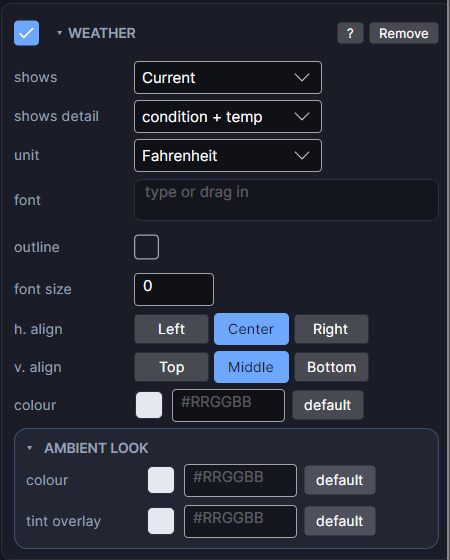
Settings
| Row | What it does |
|---|---|
| shows | Current conditions, an hourly forecast, or a daily forecast. |
| hours ahead / days ahead | For forecasts: how far ahead, 0 to 7 hours or 0 to 4 days. Use several Weather objects for a forecast row. |
| shows detail | Which reading: condition and temperature, UV index, chance of rain, temperature only, or condition only. |
| unit | Celsius, Fahrenheit or Auto. On a real watch the wearer's own unit is always used; this only changes what you see while designing. |
| font / font size | Typeface and size. Size 0 means automatic. |
| h. align / v. align | Where the reading sits in its box. |
| colour | The colour of the text. |
The editor has no live weather, so it shows the condition and temperature set in the Simulate tab. For a weather picture instead of words, use Weather Sprite.
Every object also has the shared rows (position and size, ambient look, show when, Color Style and more), explained once in Settings Every Object Shares.