← All tutorials
Gyro
Move, turn, scale or fade an object as the wearer tilts their wrist, for parallax layers and shimmer.
About 4 minutes
The Gyro component (Add Component, watch faces only) makes an object react to the wearer tilting their wrist: it moves, turns, grows or fades. Stack a few layers with small, different amounts for a parallax depth effect, or fade a highlight in and out for a shimmer.
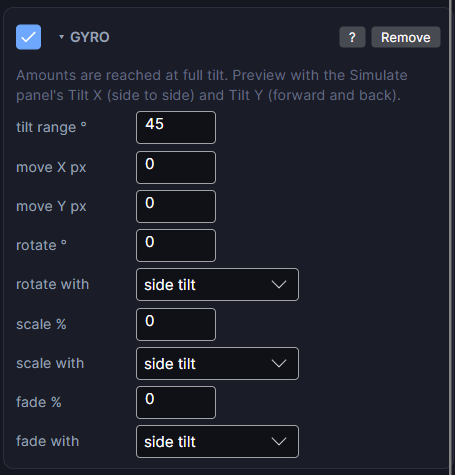
Settings
Every amount is reached at full tilt.
| Row | What it does |
|---|---|
| tilt range ° | How far the wrist tilts, either way, before the effect is at full strength. 45 feels natural. |
| move X px | Pixels moved sideways as the wrist tilts side to side. Negative moves the other way. |
| move Y px | Pixels moved up or down as the wrist tilts toward or away from you. |
| rotate ° | Degrees turned around the object's pivot at full tilt. rotate with picks which tilt drives it: side to side, or toward and away. |
| scale % | Percent bigger at full tilt (negative for smaller). scale with picks the tilt. |
| fade % | How much it fades at full tilt. Fading can only lower opacity. fade with picks the tilt. |
Preview it with Tilt X (side to side) and Tilt Y (forward and back) in the Simulate tab.
Parallax recipe
Background: move X 4. Middle layer: move X 8. Foreground: move X 14. The different speeds make the face look deep.
In ambient mode
Keep gyro layers hidden in ambient. The screen barely updates there, so the effect can't be seen anyway.