Bind Text
Show a variable's live value inside a Text object, via a format string.
About 2 minutes
Bind Text keeps an object's text in step with your variables. Write the text once, put variable names in { }, and the watch fills in the current values as they change.
Score: {score}
Everything outside the braces shows exactly as typed. Use several in one line, like {score}/{goal}.
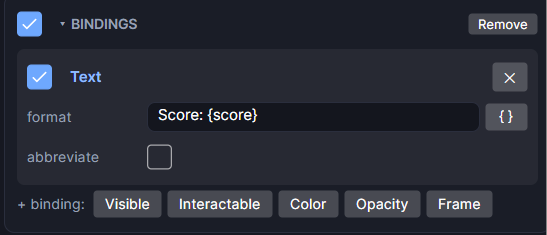
Settings
Bind Text lives in the object's Bindings card as the Text binding. Add it from Add Component or with + binding: Text on an existing Bindings card.
| Setting | What it does |
|---|---|
| format | The text to show. Each {name} is replaced with that variable's value. Click { } to pick a variable, or drag one in from the Variables panel. |
| abbreviate | Shows big numbers short: 1,250 as 1.25k, 3,400,000 as 3.4M, then G, T and up. |
| On/off checkbox | Turns this binding off without removing it. |
Inserting a variable
Click { } next to the format. The list is grouped: This screen, This object (its Object Variables), Project, Lists, Data objects & items, Purchases, Save slots and Watch (steps, heart rate, weather, the time).
Picking a Watch reading sets it up for you: it makes the variable if it's missing and adds a Ticker that reads the watch into it. See Watch Features.
Number formats
Add a format after a colon to change how a number shows. The Format section at the bottom of the { } list adds one to the variable before the cursor.
| Format | Shows |
|---|---|
{n:00} | Two digits: 7 becomes 07 |
{n:12h} / {n:ampm} | 12-hour clock / AM or PM |
{n:weekday} / {n:wkd} | Weekday name: Saturday / Sat |
{n:month} / {n:mon} | Month name: October / Oct |
{n:F} | A °C value shown in °F |
{n:.00} | Exactly two decimals: 12.50 |
{n:.##} | Up to two decimals: 12.5 |
{n:hm} | Seconds as hours and minutes: 3900 becomes 1:05 |
Good to know
- It only reads. Bind Text never changes a variable.
- Works in Game and App projects on both watches. Not offered on watch faces, which have their own clock and data objects.
The Bindings card can also hold Bind Visible, Bind Interactable, Bind Color, Bind Opacity and Bind Frame. For a bar or ring, set the variable on the Progress Bar itself.