Spawn Point
Where a GridMove player lands after a Go to Screen action names it.
About 2 minutes
A Spawn Point marks where the player lands when they arrive on a level: the spot inside a door, the top of a staircase, the start of a map. It's invisible in the game and does nothing on its own. Games only.
The quickest way to get one is Add Object ▸ Spawn Point, which places a one-tile marker. Spawn points show as green tiles in the Scene.
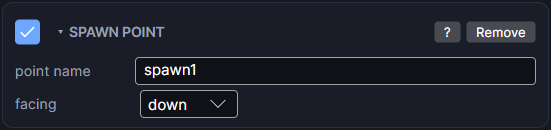
Settings
| Setting | What it does |
|---|---|
| point name | The name you pick in a Go to screen action to land the player here, like north-door. |
| facing | Which way the player faces on arrival: right, down, left or up. |
Sending the player here
- On the level, add a Spawn Point and give it a point name.
- On the door, stairs or trigger on the other screen, add a Go to screen action that goes to this level.
- In that action, set player arrives at to your spawn point's name.
When the level opens, the player is moved onto the spawn point and turned to face its facing. The player is whichever object has a Grid Move set to player input (marked ♟ in the Hierarchy).
Good to know
- player arrives at set to where he's placed leaves the player where you put him in the editor.
- A spawn point name that isn't on the level is ignored, and the player stays where you placed him.
- Under from variables (advanced) in Go to screen, spawn from reads the spawn point's name from a Text variable. That's handy for a Continue button or a world map.
- Works on both Wear OS and Apple Watch.
- Spawn Point is a Game feature. It doesn't appear in App or Watch Face projects.