Sound
Music autoplays and loops with the screen; SFX/UI play once on a named event.
About 2 minutes
Plays an audio file from your project: background music, a tap click, a coin jingle, the hum of a fountain on your map. Drop sound files into the Project panel, then pick one here.
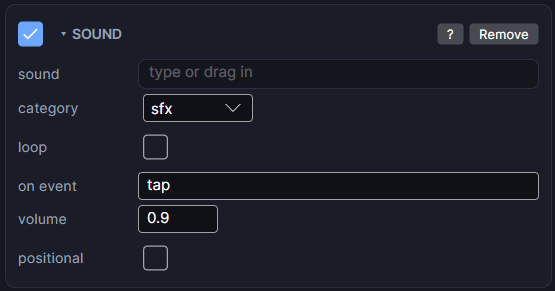
Settings
| Setting | What it does |
|---|---|
| sound | The audio file to play. Pick it, or drag one in from the Project panel. |
| category | music starts by itself when the screen opens and loops until it closes. sfx and ui are for sound effects and interface sounds. The category also decides which volume and mute setting applies. |
| loop | sfx and ui only. On: plays by itself from when the screen opens and loops (an engine hum, rain). Off: plays once each time its event fires. |
| on event | Shown for a non-looping sfx or ui sound. The event that plays it, such as a Tappable's tap event. |
| volume | This sound's own loudness, from 0 to 1. |
| positional | Makes it louder the closer it is to whoever the camera follows (usually your player), fading to silence further away. Put it on a map object: a car, a fountain, an NPC. Only the 3 nearest looping ones play at once. |
| full within | Shown when positional is on. Full volume within this many pixels. |
| silent beyond | Shown when positional is on. Silent beyond this many pixels. In between it fades smoothly. |
| left/right | Shown when positional is on. Pans a little toward the side the sound is on. You hear it in earbuds; a watch speaker is mono, so there only the distance fade comes through. |
Playing and stopping from an action
Pick the object in any action list:
- Sound ▸ Play plays its clip now, in its own category.
- Sound ▸ Stop stops the looping sounds in its category.
There are also general Play sound and Stop sound actions under Sound & feel.
Volume and mute
The loudness you hear is this sound's volume times the master volume times its category's volume. Add an Audio Manager to set those, and a Mute Toggle for a mute button.
Good to know
- Preview plays sounds through your computer's speakers, with the same looping, volume and mute rules as the watch. A file that can't play is skipped quietly, so a missing sound never stops Preview.
- Opening a new screen stops the last screen's sounds, unless a menu opens over a running map.
- Games and apps only, not watch faces. Reaches both Wear OS and Apple Watch.