Interactable
Gate-then-run logic a GridMove player's Interact event probes for: a chest, a door, an NPC.
About 2 minutes
An Interactable is something the player walks up to and presses the action button on: an NPC, a chest, a sign, a door. When the player presses their interact button, the tile right in front of them is checked, and if this object stands there, its actions run. Games only.
It works with a Grid Move player. The player's interact event is what triggers it.
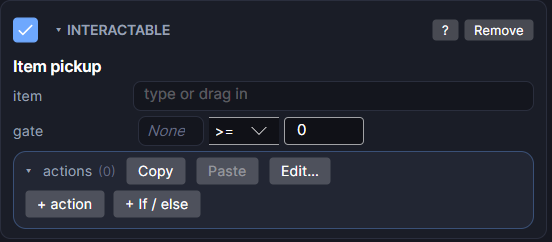
Settings
| Setting | What it does |
|---|---|
| item (Item pickup) | Optional. Pick a Data Object to turn this into an item pickup, like a Pokémon item ball. Clear it to go back to your own actions. |
| amount | Shown once an item is picked. How many the player gets. |
| into list | Shown once an item is picked. Which list it goes into, usually the player's Inventory. |
| messages | Shown once an item is picked. Shows "Found ___!" on pickup, and "There's no room for it." when the list is full (the item then stays put). |
| gate | A single check: a variable, a comparison, and a value. The actions only run when it passes. Leave the variable blank to always run. |
| actions | What happens when the player uses it: Talk, add an item, open a door, change a variable. |
When you pick an item, the Interactable fills in its own actions: add the item to the list, show the message, and remove the pickup for good (or leave it if there's no room). Change the item fields rather than editing those actions, since they get rewritten.
Add Object ▸ Item Pickup gives you a ready-made pickup. Pick its item and drop your art on it.
Example: a chest that only opens once
- Give the chest an Interactable.
- Make a variable
openedthat belongs to this object, starting at 0. - Set the gate to
opened=0. - In the actions, add the item, then Set variable
openedto1.
The first press opens it. After that the gate fails and nothing happens. Make opened a saved variable if the chest should stay open after the game closes.
Good to know
- This is only for pressing the action button. For "walk onto it" triggers, use a Collider instead.
- An object hidden by Bind Visible can't be used.
- Any action list can trigger it without the player walking up: pick the object and choose Run its actions.
- On a Tilemap you can also give a single cell its own actions (right-click the cell), without placing an object there.
- Works on square and isometric maps, on both Wear OS and Apple Watch.
- Interactable is a Game feature. It doesn't appear in App or Watch Face projects.