Grid Cursor
Grid Cursor is the tile cursor for tactics games: the player picks a tile with the crown, the d-pad or a tap, then confirms it to move a unit there or attack it.
About 2 minutes
Grid Cursor is the tile cursor for tactics games: the player picks a tile with the crown, the d-pad or a tap, then confirms it to move a unit there or attack it. The cursor is just two number variables, a column and a row, so other components and actions can read where it is. Games only.
Pair it with Grid Highlight, which draws the outline at the cursor's tile.
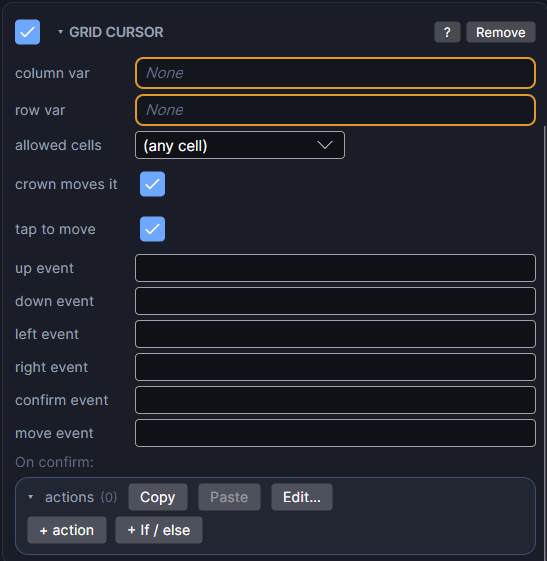
Settings
| Setting | What it does |
|---|---|
| column var | Required. The number variable holding the cursor's column. |
| row var | Required. The number variable holding the cursor's row. |
| allowed cells | Optional. A list of tiles the cursor may stop on, like the one Reachable cells or Cells in range writes. (any cell) lets it go anywhere on the map. |
| crown moves it | On: turning the crown steps the cursor. With allowed cells set, it steps through those tiles (nearest first, when a Tactics grid action wrote the list). Otherwise it steps across the map in reading order. On by default. |
| tap to move | On: tapping the map moves the cursor to the tapped tile. Tapping the cursor's own tile again confirms it. On by default. |
| up event, down event, left event, right event | Optional. Events that move the cursor one tile, for example from a HUD d-pad. With allowed cells set, it jumps to the nearest allowed tile that way. |
| confirm event | Optional. A button's event that confirms the cursor's tile, same as tapping it. |
| move event | Optional. Sent every time the cursor lands on a new tile. A good moment to show who's standing there. |
| On confirm | The actions that run when the player confirms a tile. Read the column and row variables to know which one. |
A typical turn
- When a unit's turn starts, run Reachable cells into a list, and set that list as list 1 on your Grid Highlight and as allowed cells here.
- The player turns the crown or taps to pick a blue tile.
- They tap it again (or press the confirm button). The On confirm actions walk the unit there with Move (Grid).
- While the enemy takes its turn, turn the cursor off with a Disable action on the Grid Cursor, and Enable it again after.
Good to know
- On an isometric map the directions follow the grid: right moves down-right, down moves down-left, left moves up-left, up moves up-right.
- Works on both Wear OS and Apple Watch.
- Grid Cursor is a Game feature. It doesn't appear in App or Watch Face projects.
- Related: Grid Move for the units themselves, and Tilemap for the map.