Object Variables
Object Variables are variables that belong to one object, like a self switch: a door's open, a chest's looted, an NPC's talkedTo.
About 2 minutes
Object Variables are variables that belong to one object, like a self switch: a door's open, a chest's looted, an NPC's talkedTo. The object's own actions use them as self.name. Every copy of the object keeps its own value, so ten chests built from one design each remember being opened.
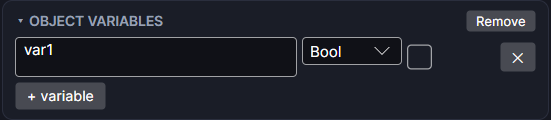
Adding them
Choose Add Component ▸ Object Variables. A Bool variable named var1 appears on a new Object Variables card. Click + variable for more.
Settings
Each row is one variable:
| Setting | What it does |
|---|---|
| Name | The variable's name. This object's actions use it as self. plus the name. Spaces become underscores. |
| Bool / Number | What kind of value it holds. |
| Start value | A checkbox for a Bool (ticked starts it true), or a number box for a Number. |
| ✕ | Removes that variable. |
| + variable | Adds another one. |
Using them
In any variable box on this object (an action, an only if check, a binding), they're listed under This object. For example, on a chest:
- Add an Object Variable
looted, Bool, unticked. - In the chest's actions, give the reward actions an only if of
self.lootedis false. - Add a Set a variable action at the end that sets
self.lootedto true.
Show one in text with Bind Text, like Talked {self.timesTalked} times.
Good to know
- Only this object can use them. Other objects can't reach
self.values. - They keep their value for the whole run, like a project variable, so an opened door stays open when you leave the screen and come back.
- Renaming one updates this object's own actions that use it.
- The card only shows when one object is selected.
- Works in Game and App projects on both watches. Not offered on watch faces.