← All tutorials
Notification Count
How many notifications are unread, as a number that hides itself at zero. Never reassignable by the wearer.
About 4 minutes
Shows how many notifications are unread. It reads the count directly instead of using a complication slot, so it doesn't use one of the face's eight slots and the wearer can't repoint it to something else by accident.
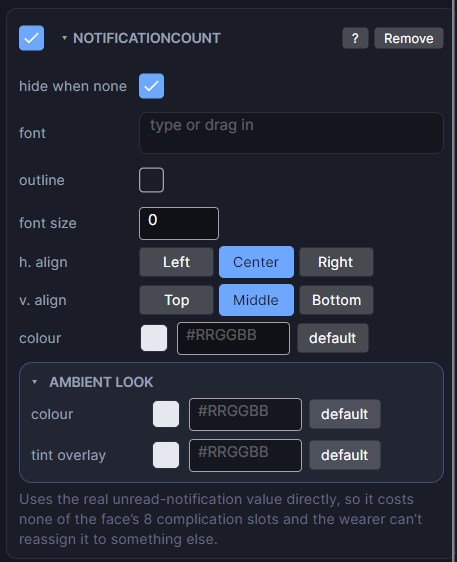
Settings
| Row | What it does |
|---|---|
| hide when none | Hides it completely when nothing is unread, instead of showing "0". On by default, and it works on the real watch too. |
| font / font size | Typeface and size. Size 0 means automatic. |
| h. align / v. align | Where the reading sits in its box. |
| colour | The colour of the number. |
For a badge look, put a small Shape circle behind it, and give the Shape a show when of unread notifications above 0 so it hides along with the number. Test with the unread count in the Simulate tab.
Every object also has the shared rows (position and size, ambient look, show when, Color Style and more), explained once in Settings Every Object Shares.