Input Field
A tappable text or number field that hands off to the OS keyboard. Preview-only, no build path yet.
About 2 minutes
Input Field is a box the player taps to type text or a number. Tapping it opens the watch's keyboard; when they finish, the value is saved into a variable and the field's own actions run. Use it for a player name, a PIN, or an odometer reading.
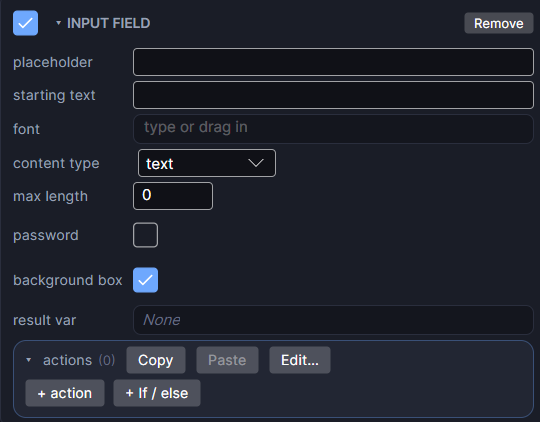
Add one with Add Object ▸ Input Field, or add the component to an existing object.
Settings
| Setting | What it does |
|---|---|
| placeholder | Dimmed text shown only while the field is empty. It never counts as typed text. |
| starting text | Text already in the field when the screen opens, as if the player typed it. Usually empty. |
| font | The font for both the typed text and the placeholder. Empty uses the watch's default. |
| content type | text, integer or decimal: what the keyboard should accept. |
| max length | The most characters allowed. 0 means no limit. |
| password | (text only) Hides what is typed with dots. |
| background box | Draws the built-in box behind the text. Turn it off to use your own Image behind the field instead. |
| show variable | (integer or decimal) Starts from the result variable's current value, so changing the last digits is enough. Set the variable in the screen's open event to choose the starting value. |
| result var | Optional. The variable the typed value is saved into. A text field saves into a text variable, a number field into a number variable. |
| actions | What runs when the player submits. Click + action to add a row. |
Showing and checking what was typed
- Show it elsewhere with Bind Text and
{yourVariable}. - Bind Visible and Bind Interactable can check the field directly: is empty, has text, equals, length ≥ or length ≤. For example, enable a Save button only once the name has at least 3 letters.
Good to know
- content type limits the keyboard on Wear OS only. Apple Watch always shows its normal keyboard, so check the value with an only if on your actions if a bad entry would matter.
- With Bind Interactable failing, the field greys out and ignores taps.
- In Preview, a small text box pops up in place of the watch keyboard.
- Works in Game and App projects on both watches. Not offered on watch faces.