Line
Draws a band, rope or tether from this object to another one, with both ends following them as they move.
About 2 minutes
Draws a band, rope or tether from this object to another one, with both ends following them as they move. Use it for slingshot bands, a grappling rope, a leash or a power cable. It can get thinner and change colour as it stretches.
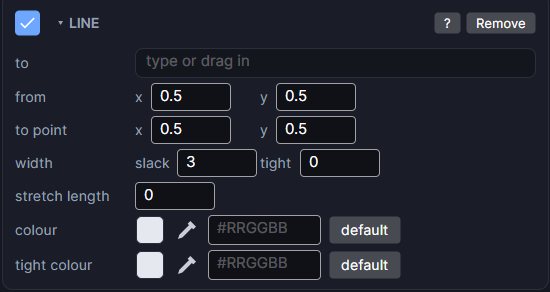
Settings
| Setting | What it does |
|---|---|
| to | The object at the other end, such as a slingshot's pouch. Pick it, or drag it in from the Hierarchy. |
| from | Where the line starts on this object's box, x and y from 0 to 1. 0.5, 0.5 is the centre; 0 is the left or top. |
| to point | Where the line ends on the other object's box, also 0 to 1. |
| width | slack: the width in pixels when it's loose. tight: the width once it's stretched to the stretch length. 0 keeps the same width all the time. |
| stretch length | How long the line is, in pixels, when it counts as fully stretched. From there on it's at its tight width and colour. 0 means it never changes. |
| colour | The line's colour and opacity when slack. |
| tight colour | The colour it blends to as it stretches. Leave it empty to keep one colour. |
Example: a slingshot
- Make the two prongs and the pouch as separate objects.
- Add a Line to the back prong and to the front prong, both with to set to the pouch.
- Set from to the tip of each prong (a y near
0). - Set stretch length to how far the pouch can be pulled, and pick a tight colour like red.
The line is drawn just after its own object. So the back prong's band sits behind the pouch and the front prong's band sits in front, and the shot looks like it's held between them.