Mute Toggle
Flips one audio category's mute state on a tap: the on/off half of a settings screen.
About 1 minutes
Turns one sound category's mute on or off each time its event fires. Put it behind the mute button on a settings screen: the first tap mutes, the next tap unmutes.
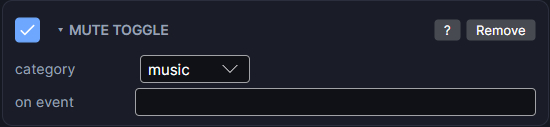
Settings
| Setting | What it does |
|---|---|
| category | Which sounds to mute: sfx, music or ui. |
| on event | The event that flips the mute, such as the mute button's tap event. |
How to use it
- Make a button with a Tappable that sends an event, for example
muteMusic. - Add Mute Toggle to it, set category to music and on event to
muteMusic. - You can also flip it from any action list with Mute Toggle ▸ Toggle.
Good to know
- Muting stops the looping sounds in that category, and they come back when you unmute.
- There's no master mute here. To silence everything, set the master volume to
0with the Audio Manager. - Pair it with an Audio Manager for volume sliders on the same screen. Sound is what plays the clips.
- Games only. Works in Preview and on both Wear OS and Apple Watch.