Events
Screen-wide logic that belongs to no single object: when an event is sent, or the screen opens or closes, run actions.
About 3 minutes
Most actions live on an object, like a button's tap. Events is for logic that belongs to the whole screen instead: "when levelUp is sent, play a sound, burst some particles and add a point", without making a dummy object to hold the list.
Open it from View ▸ Panels ▸ Events. Each screen's events also show in Flow View when you select that screen.
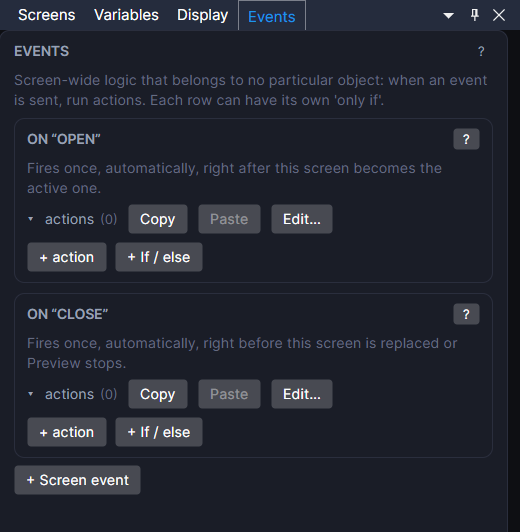
Open and close
Every screen always has two rows you can't remove:
- on "open": runs once, right after the screen becomes the one showing. Use it to set things up: reset a counter, start music, resume where the user left off.
- on "close": runs once, right before the screen is replaced by another (or Preview stops). Use it to tidy up or save.
They start empty. Add actions to them only when you need them.
Your own events
Click + Screen event to add a row, then pick which event it listens for in on event. Give it actions with + action, just like any other action list. Each action can have its own only if check.
An event can be sent by:
- a Tappable when it's tapped,
- a Ticker on its timer,
- a Collider when two things touch,
- the Send event action, from any action list on any object, screen or action sheet,
- a data source when its fetch finishes (
name_loadedorname_failed).
Several rows can listen for the same event. They run in the order they're listed.
Good to know
- A screen's events only listen while that screen is open. An event sent while another screen is showing won't run them.
- Events belong to screens, so prefabs don't have them. For logic that should travel with an object or a prefab, put an On Event component on the object instead. It works the same way.
- When a flat list of actions isn't enough and you need real branching, Graphs sit right below Events and run a node graph when an event fires.
- Events run the same in Preview and on Wear OS and Apple Watch.
- Watch faces don't have Events. Watch faces can't run actions.