In-App Purchases
Sell a one-time unlock or a consumable from your game or app with Google Play Billing and StoreKit.
About 5 minutes
Games and apps can sell things through the watch's own store: a one-time unlock (the full game, Pro features, an ad-free mode) or a consumable that's used up and bought again (a pack of coins, extra lives, credits). The store handles payment; your project gets a variable that says what the player owns. WristForge takes no cut.
1. Add the product to your catalog
Open Window, then IAP Catalog… and add a product:
- Id: a short name used inside your project, like
proorcoins_100. - Kind: NonConsumable for a one-time unlock, Consumable for something used up and bought again.
- Google Play product id and Apple product id: the ids you create in each store's console. They can differ.
- Display name and description: shown in Preview only. The real name and price always come from the store.
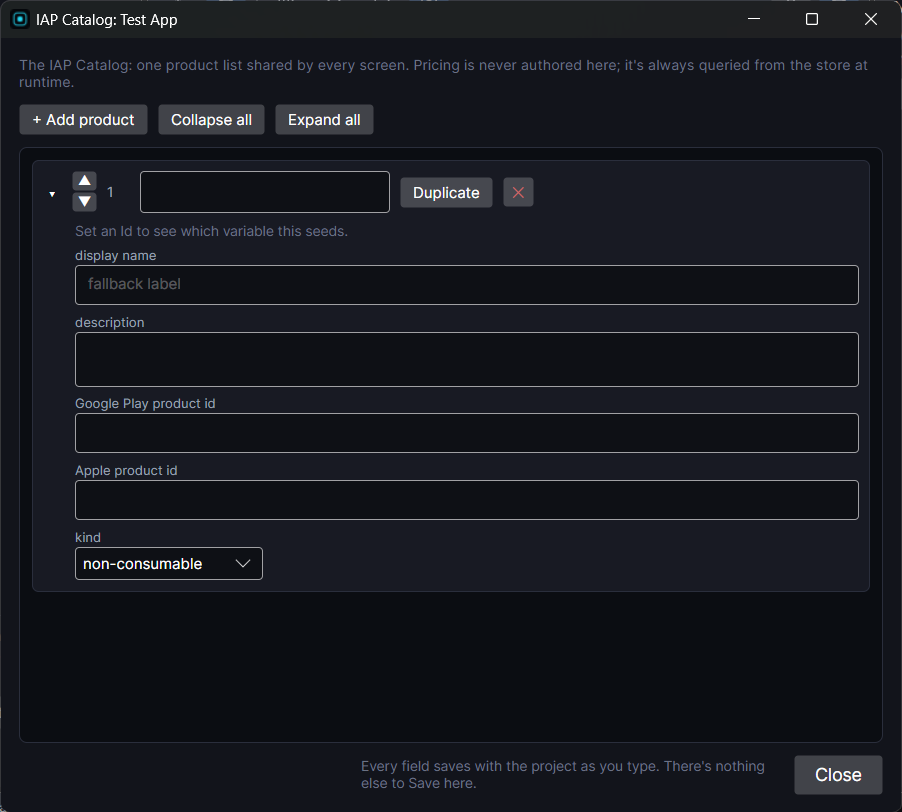
Each product makes a variable: pro.owned (1 when owned) for an unlock, or coins_100.count for a consumable, which grows by the grant amount on each purchase. For a consumable that adds to a currency, add the grant to your currency variable in On Purchase Complete instead.
2. Add a buy button
Add the IAP Button component to a button. It doesn't need a Tappable alongside it.
- Mode: Purchase or Restore.
- Product: from your catalog.
- Price text: point it at a text object to show the store's live price, in the player's currency.
- On Purchase Complete and On Purchase Failed: actions to run, like a buzz and a thank-you screen.
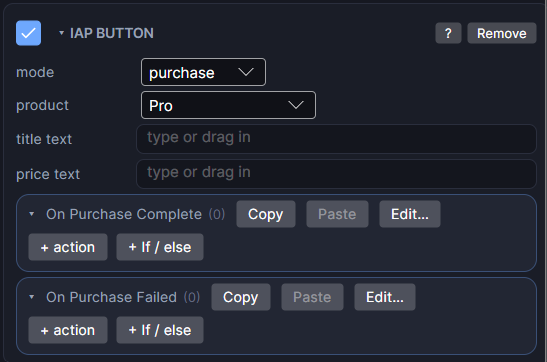
Add a Restore button on the same screen. Stores require a way to restore purchases on a new watch.
3. Unlock things
Use the owned variable anywhere: Bind Visible on pro.owned to show Pro features, an only if on a level button so it only opens once bought, a "PRO" label on a tile until it's bought. See Showing Data for these.
4. Create the product in the store
- Google Play: in Play Console, under Monetize, then Products, then In-app products, create a product with the same Google Play product id and activate it. Purchases only work in a build installed from Play, so test with an internal testing release and a license tester account. See Publishing on Google Play.
- App Store: create it in App Store Connect and test with a Sandbox account.
In Preview, buying always succeeds so you can test both states.
Watch purchases are small and quick. One clear unlock with a short list of what it adds usually sells better than several small items.