Variables (Full Window)
Every Screen and Project variable in one table: add, rename, retype, group and mark Saved.
About 6 minutes
Open it from Window ▸ Variables…, or click All variables… in the Variables tab (bottom left). It's the full editor behind the lightweight docked Variables panel.
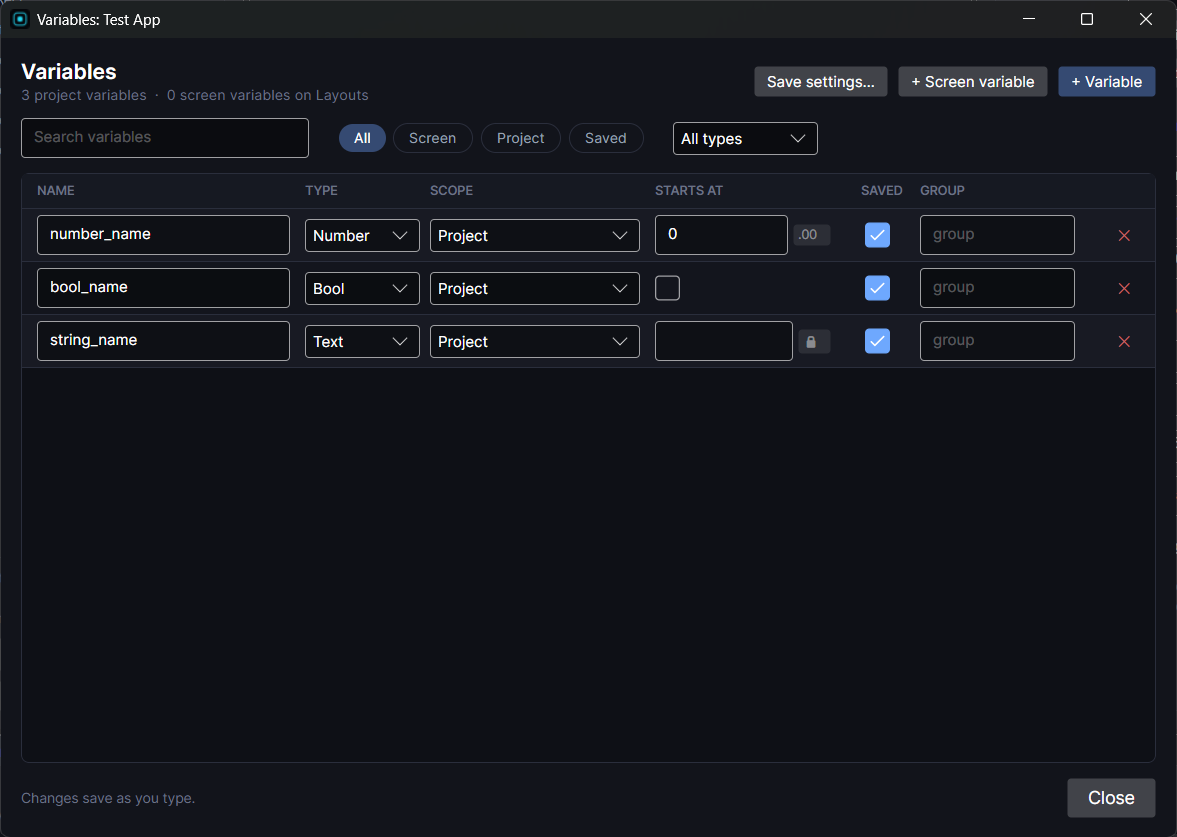
The table
One row per variable:
- Name: what you pick it by in actions and Bind Text.
- Type: Number, Bool or Text, for screen and project variables alike. Enum types are set in Save Data. See Variables for every type.
- Scope: Screen resets every time its screen opens. Project is shared by every screen. Change it here to move a variable between the two.
- Starts at: the starting value. Numbers have a
.00toggle to keep decimals; Text has a 🔒 toggle for secrets like sign-in tokens. - Saved: tick it to keep a Project variable across relaunches.
- Group: type any name to file the variable under it. Right-click a group's header to rename or ungroup it.
+ Variable adds a Project variable and + Screen variable adds one to the open screen. Use the search box, the All / Screen / Project / Saved pills and the type dropdown to find things in a big project. Every change saves as you type.
Save settings
Save slots, auto save and load, saved Data Objects and lists, and Clear saved progress all live in Window ▸ Save Data…, which the Save settings… button opens. See Save Data.
For the Screen vs Project idea itself, see Screen Variables vs. Project Variables.