Hierarchy
The tree of every object on the current screen. Where you add, rename, and reparent things.
About 4 minutes
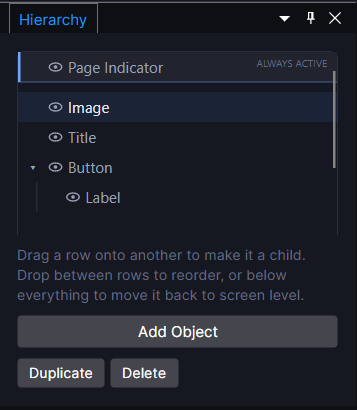
A per-screen tree view: one row per object, nested under whatever it's parented to. Right-click empty space to add a new object; right-click an existing one for rename, duplicate, delete, and reparenting.
Common moves
- Add: right-click empty space, pick an object type (
Add Text,Add Button,Add Image, and so on. Starter shapes, not raw empty components). - Reorder / reparent: drag a row onto another to make it a child, or between two rows to reorder siblings. Draw order follows this list, so a later row draws on top of an earlier one.
- Multi-select:
Ctrl/Cmd-click orShift-click a range; Cut/Copy/Paste and most Inspector fields apply to the whole selection at once. - Eye toggle: hides an object in the Canvas/Preview without deleting it; hiding a parent cascades to its children.
Where the object actually gets its behavior
Adding an object here just places a shape. Select it and open the Inspector to attach components, actions, and bindings.