Inspector
The property editor for whatever is selected. Transform, components, and their actions.
About 5 minutes
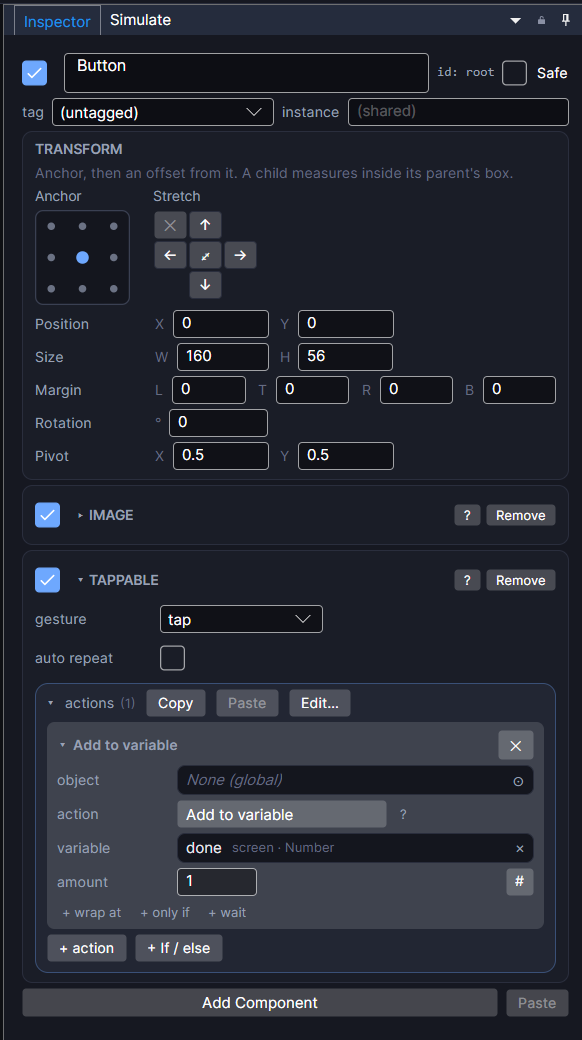
Whatever is selected in the Hierarchy or Canvas shows here, card by card: a Transform card (position/size/rotation) at the top, then one card per attached component, each with its own fields and, for components that can react to something (Tappable, Ticker, On Event, a Collider). An actions list.
Reading an actions list
Each row in an actions list is one action: a kind (Add to variable, Set Frame, Go to screen, and dozens more, grouped by category in the picker), a Target (see Targeting), whatever fields that kind needs, and an optional only if condition (see Guards). Drag a row by its name to reorder it; click its chevron to collapse it; + action at the bottom of the list adds a new one.
Select several objects that share a component (say, five Text objects) and a field you edit in the Inspector applies to all of them together: a mixed value across the selection shows as blank rather than picking one arbitrarily.
The + Add Component button at the bottom of a selected object's card list is how you attach something beyond its starting shape: a Physics body, a Collider, a Sound, anything from the full component list.