The Canvas
The main WYSIWYG view: drag, resize, and position objects directly on the screen.
About 4 minutes
The Canvas (labeled Scene in its tab) is the always-open, non-closable view showing the current screen exactly as it will lay out. Drag an object to move it, drag its handles to resize, click to select. It's the direct-manipulation counterpart to the Inspector's fields: most transform edits are faster done here than by typing numbers.
What it shows
Every visible object on the active screen, at its real design-pixel position and size, including the device's actual screen shape (round or square) and any grid/snap overlay you've turned on.
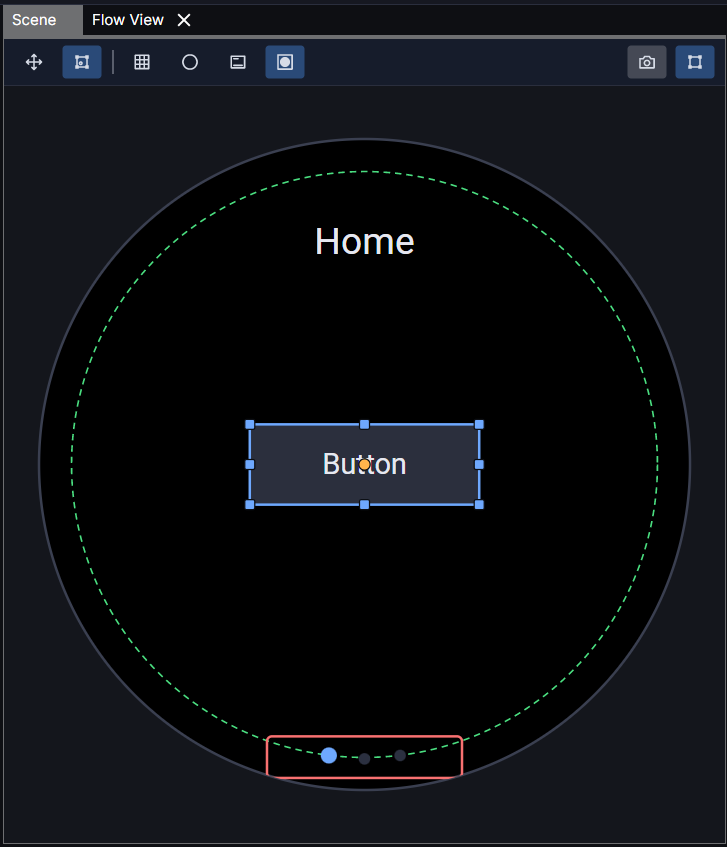
Scene grid lines and guide overlays stay exactly where you left them. Turning on a grid or changing its spacing is a deliberate choice, not something that resets or drifts as you work.
The Canvas shows LAYOUT, not behavior, nothing here is running. Press F5 to actually play the screen; see Preview.