Flow View
A node graph of every screen in your project and how they connect.
About 6 minutes
A birds-eye map: one node per screen, wired together by every Go to screen action that connects them. Instead of remembering "which button leads where" by opening each screen, you can see the whole navigation graph at once, and drag a screen's own nub onto another to CREATE that connection, rather than digging into a Tappable's actions to add it.
What else lives here
Level Sets get their own badge node (a Level Set is a small ordered list of screens, not a screen itself. See its own asset type), and a level absorbed into a set can be inspected right in place on the canvas without leaving Flow View.
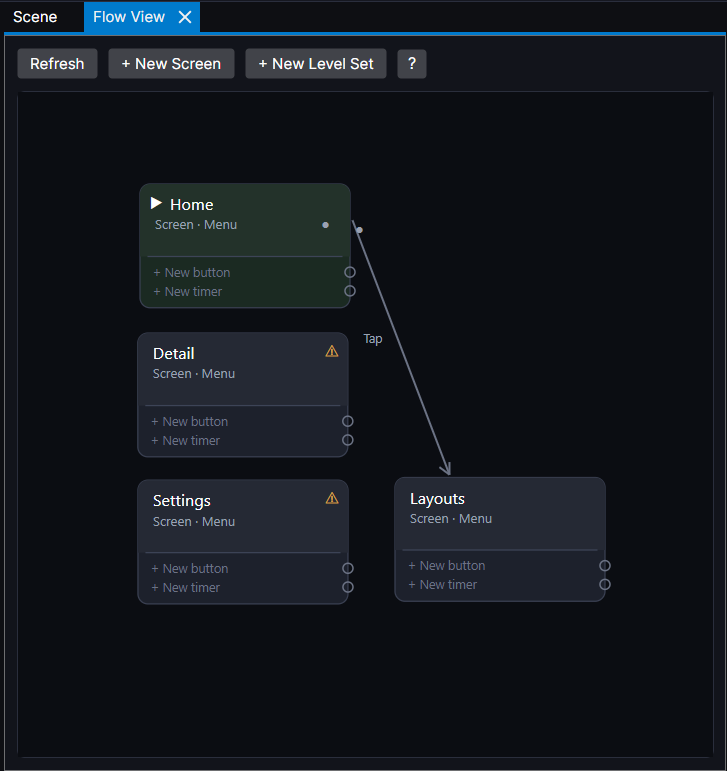
Dragging a connection in Flow View and adding a Go to screen action in the Inspector do the same underlying thing. Flow View is a faster way to see and make that connection when you're thinking about your game's overall shape rather than one button at a time.