Project Dashboard
The one project-wide settings surface. Screens, globals, build, and the shared dialogue box.
About 4 minutes
Window ▸ Project Dashboard… is the closest thing WristForge has to a single settings screen: everything on it is a project-wide concern, not a per-screen or per-object one.
What's on it
- Screens: a quick summary list of every screen in the project, for a bird's-eye look without opening Screens.
- Project Variables: a fast glance at your globals (hidden for a Watch Face project, which has no gameplay variables).
- Build: a one-click
Build Nowbutton and the current build target, the same entry point the menu bar's own Build action gives you. - Dialogue: the ONE shared dialogue box prefab every conversation in the project renders through (see Adding a Dialogue Scene). Pick it here once,
Edit boxto customize its look.
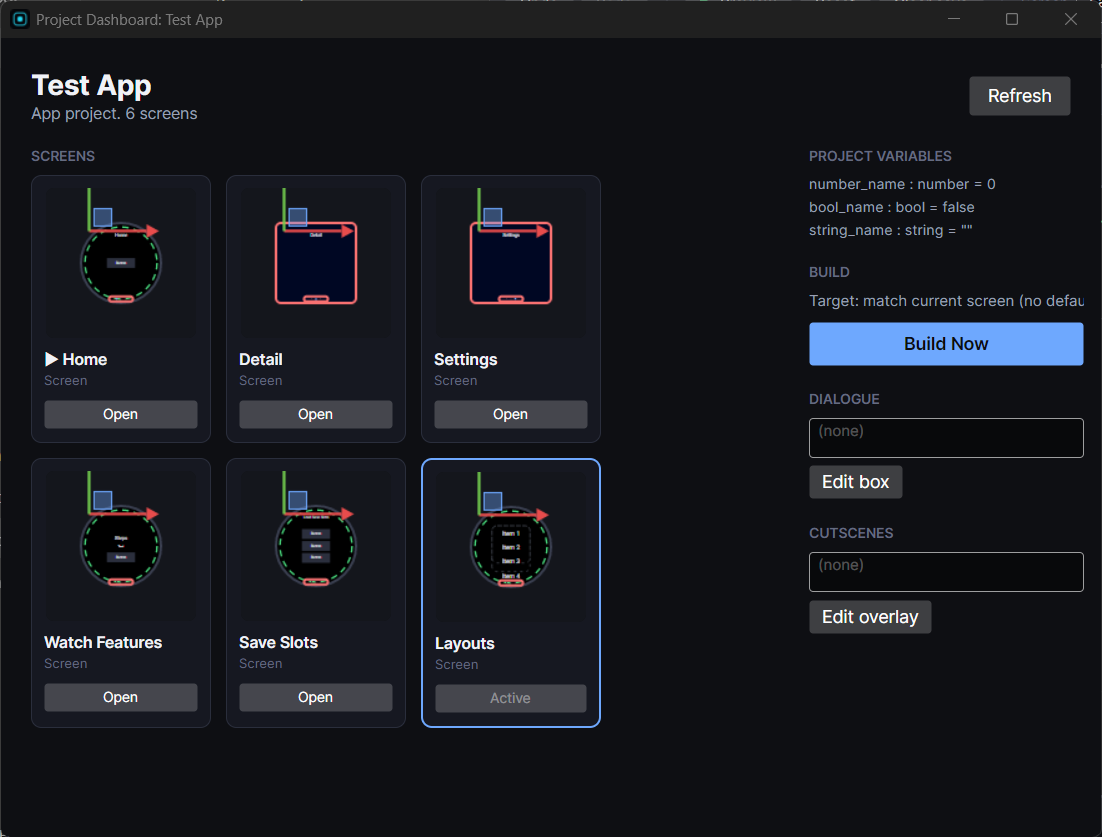
Reopening reuses the same window
Like most of WristForge's standalone windows, opening this twice doesn't stack up duplicates. It refreshes and refocuses the one instance.