Complications
Live data slots the wearer fills: five shapes, the data each can show, and which start with real data.
About 8 minutes
A complication is a small slot on the face that shows data from somewhere else: steps, battery, the next calendar event, weather. You design where it sits and how it looks. The wearer chooses what it shows, from their watch's own face editor.
Five shapes
Each shape only accepts the kinds of data that fit it:
| Shape | Can show |
|---|---|
| Complication Circle | Short text, range value, small image, icon |
| Complication Small Box | Short text, range value, small image, icon |
| Complication Large Box | Long text, range value, small image |
| Complication Line | Short text only |
| Complication Edge | Short text, long text, range value, goal progress, weighted elements |
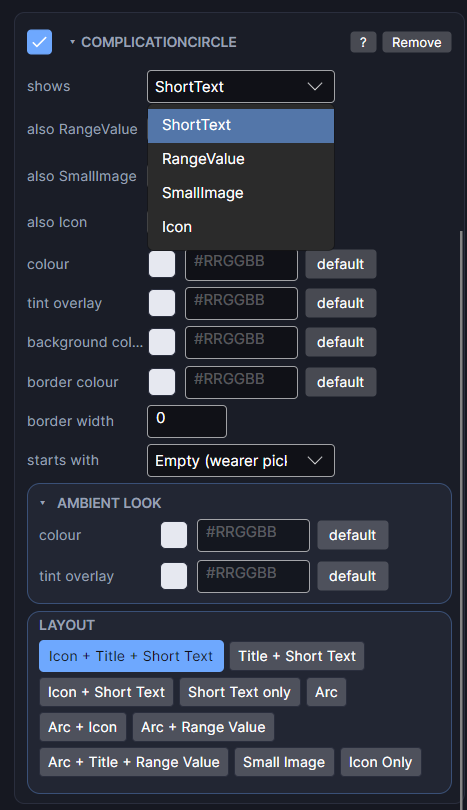
The Inspector's shows row sets the main kind of data. Tick the also options to accept more kinds as well; that widens which data sources the wearer can pick. Complication Line has only one kind, so it has no dropdown.
Edge complications follow the curve of the bezel. A face can have one Edge setup: a single Edge slot, or Complication Edge (Duo) (left and right) or (Quad) (one per quarter) from Add Object, which create the slots already in position.
Which start with real data
Each slot has a starts with row: what it shows the moment the face is installed, before the wearer picks anything. Choose from watch battery, step count, heart rate, date, day of week, day and date, time and date, world clock, next event, sunrise and sunset, an app shortcut or a favourite contact, or leave it on Empty (wearer picks).
New slots start with a sensible default for their kind:
| Kind | Starts with |
|---|---|
| Short text | Step count |
| Range value | Watch battery |
| Long text | Next calendar event |
Once starts with is set, a fixed row appears. Tick it and the wearer can't change that slot; it always shows your source. Leave it off and they can swap it for anything that fits.
Goal progress and weighted elements have no built-in source on Wear OS, so those slots install empty for the wearer to fill. That's normal for every watch face app, not a WristForge limit.
Sample data while you design
The Scene fills each complication with sample data so you can judge the layout. On a real watch it shows whatever the wearer picked. If it looks right with the sample data, it will look right with real data.
How many
A face can have up to eight complication slots. Several readouts don't use one at all, because Watch Face Format gives them their own data: Battery Level, Heart Rate, Step Count, Weather, Moon Phase and Notification Count. They also can't be reassigned by the wearer, which is what you want for something like an unread badge.
Help, then Tours, then Complications adds one to your face and points out each of these settings.