Bluetooth Devices (Beta)
Connect a heart rate strap, bike sensor, power meter, running pod or MindWave headset and read it on the watch.
About 4 minutes
Watches can talk to Bluetooth sensors worn alongside them. WristForge connects five kinds, with one action to connect and one to read.
Bluetooth is in beta. It follows the Bluetooth standards, but it hasn't been tested on every watch and sensor yet. If yours doesn't connect or reads oddly, tell us the watch and the device on our Discord or at support@stonegolemstudio.com.
| Device | What you get | Wear OS | Apple Watch |
|---|---|---|---|
| Heart rate strap: any standard Bluetooth chest or arm strap (Polar, Garmin, Wahoo and most gym straps) | Heart rate, HRV, the gap between beats | Yes | Yes |
| Bike speed and cadence sensor: any standard one (Wahoo, Garmin, Magene, CooSpo and most others) | Speed, distance, pedalling cadence | Yes | Yes |
| Power meter or smart trainer: pedals, cranks and trainers that send standard cycling power | Watts, plus cadence on most | Yes | Yes |
| Running pod (foot pod): Stryd, Polar, Garmin and other standard pods | Speed, distance, cadence, stride length | Yes | Yes |
| NeuroSky MindWave (Mobile and Mobile 2) | Attention, meditation, signal, blinks and 8 brainwave bands | Yes | Not yet |
The strap, bike sensors, power meters and pods work with any brand because each kind speaks the same standard Bluetooth language. The MindWave uses its own, and it uses an older kind of Bluetooth that Apple Watch apps aren't allowed to use, so it's Wear OS only for now.
Show a reading
Select a text object, add Bind Text, click { } and pick a Bluetooth reading near the bottom of the Watch section: Strap: heart rate, Bike sensor: speed, Power meter: power, Running pod: speed, MindWave: attention and so on. That sets everything up: the device connects when the screen opens, and the text keeps itself up to date. The first time, the wearer is asked to allow Bluetooth.
For the MindWave, pair it in the watch's own Bluetooth settings first (PIN 0000 if it asks). The others need no pairing: WristForge finds them. Spin the wheel or cranks (or start running) to wake a sensor up.
Pick the device's connection reading too. It reads 1 while searching, 2 when connected, 3 if Bluetooth is off or not allowed and 4 if nothing was found (searching gives up after 20 seconds). Use Bind Visible on it to show "Looking for your strap…" at 1 and "Strap not found" at 4, with a button that connects again.
Every value you can read
The { } menu covers the common ones. For the rest, use the Read sensor action yourself:
| Read sensor | Gives |
|---|---|
| Bluetooth: status | 1 searching, 2 connected, 3 Bluetooth off or not allowed, 4 not found or lost |
| strap: heart rate | Beats per minute |
| strap: HRV | Heart rate variability (RMSSD over the last 30 beats, in ms). Settles after about 30 beats |
| strap: last beat gap | Milliseconds between the last two beats |
| bike: speed (km/h or mph) | From a speed sensor, or a power meter or trainer that sends wheel data. 0 after 3 seconds without a wheel turn |
| bike: cadence | Pedal turns per minute, from a cadence sensor or a power meter |
| bike: distance (km or mi) | Since this connection started |
| power meter: power | Watts |
| running pod: speed (km/h or mph) | Running speed |
| running pod: cadence | Steps per minute |
| running pod: stride length | Metres per stride |
| running pod: distance (km or mi) | Since this connection started |
| MindWave: attention / meditation | 0 to 100 |
| MindWave: signal | 0 to 100; 100 means good contact on the forehead |
| MindWave: blink strength | 0 to 255 |
| MindWave: delta to mid gamma | Each brainwave band as a percent of the total, once a second |
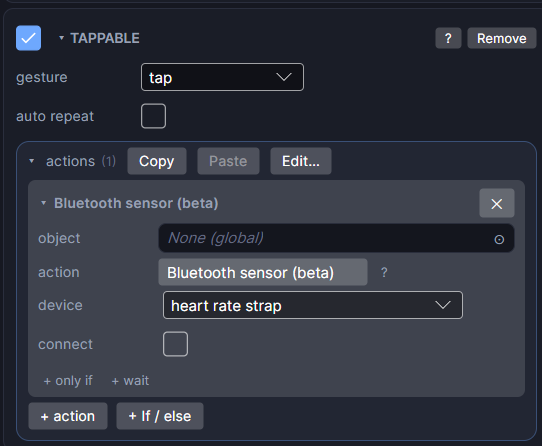
To connect by hand, add Bluetooth sensor (in Variables) with a device and connect ticked.
Bike speed and distance assume a 2.105 m wheel (a 700x25c road tyre). Mountain bikes and smaller wheels read a little high. A speed sensor counts wheel turns, so the size is what turns them into kilometres.
3. Disconnect
Add another Bluetooth sensor with connect unticked where the session ends. Only one device connects at a time, so a screen reads the strap or the bike sensor, not both.
Testing without a device
The Simulate tab stands in during Preview:
- Strap: tick found and set bpm and HRV. Untick found to see what happens when no device is there (status 4).
- Bike: set speed, cadence and watts. Distance builds up from the speed while Preview runs.
- Run: set speed and steps per minute. Stride and distance follow from them.
- MindWave: set attention and meditation by hand, or use the real headset. Pair it with your PC, find its outgoing COM port in Windows' Bluetooth settings and type it into the MindWave row. Preview then reads the real headset.
Game controllers and other devices
- Game controllers: Apple Watch apps can't use game controllers at all (Apple's controller support doesn't include watchOS). Wear OS doesn't stop it, but WristForge doesn't read controllers yet, and not every Wear OS watch will pair one.
- Other devices: smart scales, blood pressure cuffs and glucose meters also have standard Bluetooth formats, but they take one reading and hang up, which suits a phone better than a game. Ask if your project needs one.
The MindWave's attention and meditation are NeuroSky's own formulas: great for feedback and games, not medical measurements. Say so in any app that shows them.