Giving a List of Things Names and Data
Give each entry a name and stats with a Data Table, read one row at a time by the same variable that picks its picture.
About 10 minutes
Say your monsters aren't just "a picture that cycles". Each one also has a name, and maybe later a resistance or a loot tier. In code you'd reach for an array of small objects: name, sprite, a couple of stats. For one object that steps through a roster, WristForge splits that into two pieces: a Data Table for the words and numbers, and a sliced sheet for the art.
The data half: a Data Table
A Data Table is rows and columns, like a small spreadsheet inside your project. In the Project panel, choose New data ▸ Data table, add a column for each thing a row needs (name, maybe title), and add one row per monster. The first row is row 0, the second is row 1, and so on, matching the frame numbers on your art sheet. Columns can be Number, Bool or Text.
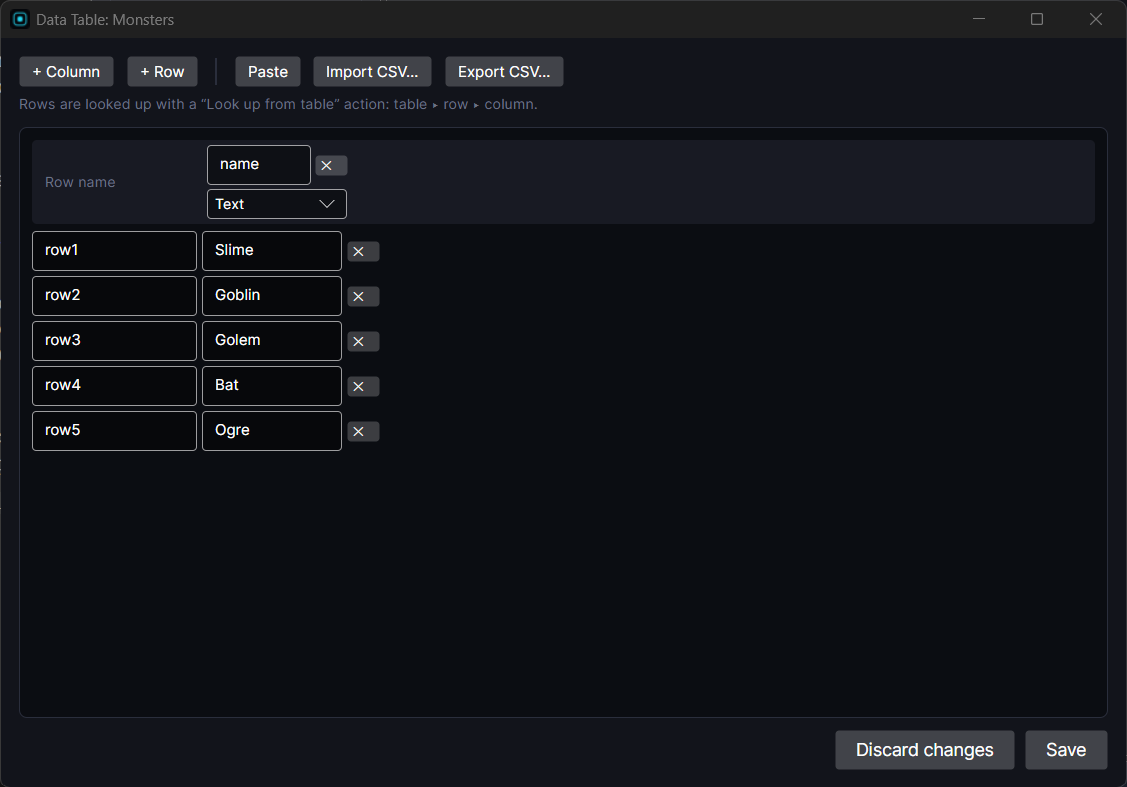
To read a row while the game runs, use the Load table row action. Pick the table under data table, and set row number to the variable holding "which one right now" (monsterIndex). It copies every column of that row into the variable with the same name: text columns into Text variables, numbers into Number variables. So make a Text variable called name, and after Load table row runs it holds that monster's name. Show it with a Bind Text component using a format like {name}. Columns without a matching variable are simply skipped.
Look up from table reads one cell, and it finds the row by its name rather than its position. It also can't read Text columns into a variable yet. For "row number N, including its name", Load table row is the one you want.
The trick that makes this feel like one list instead of two: use the same index variable for both. monsterIndex feeds Set Frame (which picture) and Load table row (which name). See Cycling an Object's Art with Set Frame. They only stay in sync because you build them side by side: row 7 in the table is frame 7 on the sheet, always. Run both actions together, in the same action list.
The picture half stays a sheet
A Data Table can't hold pictures. Its columns are Number, Bool and Text only, so the art stays on the sliced sheet and the shared index ties the two together.
If what you actually want is a whole roster on screen at once, like an inventory, a shop or a character select grid, there's a better fit. A Data Model can have picture fields alongside names and numbers, and a List of those entries can fill a Grid Layout with a List Entry that shows each one's picture and name. See Showing a List.
Anything that's "a small fixed roster of named things" fits this shape: items, dialogue speakers, level names, a shop's stock. The table doesn't care what the rows represent. More on tables in Data Tables.