Hybrid watch face
Paddock
by WristForge
125 coinsGet it with Face Hub
Open Face Hub on your watch or phone and search for “Paddock”. Needs Wear OS 6 or newer.
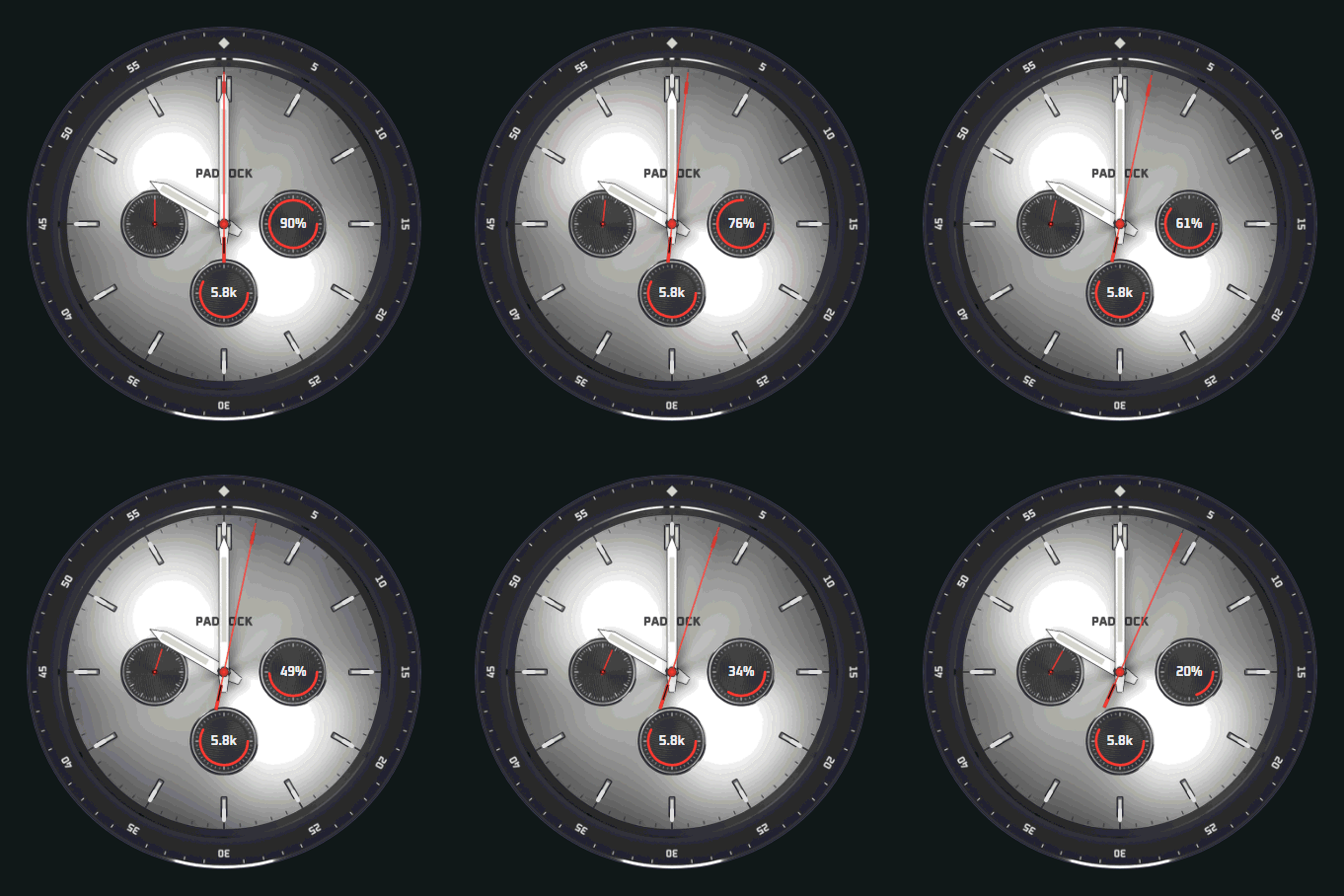
A panda racing chronograph rendered in 3D: silver sunray dial, three black snailed subdials with running seconds, battery and steps, applied markers with lume, sword hands and a black ceramic bezel. Five accent colors.
What's on this face
- Display
- Analog hands
- Readouts
- Battery, Step count
- Gauges
- Tick ring, Progress arc
- Customization
- Customizable colors
- Ambient
- Custom always-on treatment
Browse similar
How to install
- Install Face Hub from Google Play on your watch (or phone, it installs to both).
- Find Paddock in the catalog and tap Get.
- It is on your wrist a few seconds later. Long-press the face to customize it.
You might also like
All watch faces
Made in WristForge
Every face here was built in a free visual editor. Make your own.
Layers, live watch data and a real Timeline, built for Wear OS, Amazfit and Garmin. No code. Publish to Face Hub, or ship it on Google Play or the Zepp Store yourself.